

The “Amazon Prime – Your membership has expired” email scam is a phishing campaign that impersonates Amazon to trick recipients into disclosing their account credentials. The phishing emails claim that the recipient’s Prime membership has expired and that a special renewal offer is available. To supposedly restore their subscription, recipients are instructed to complete a verification process using a code provided in the email.
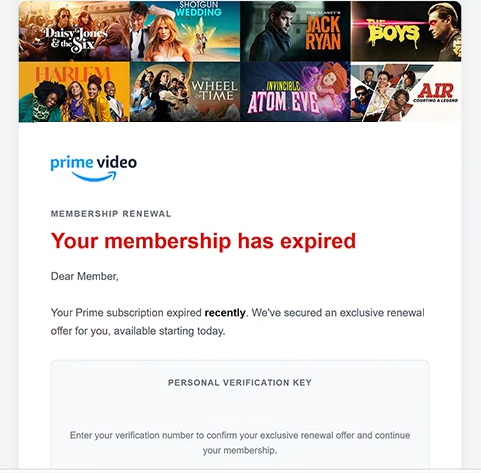
The phishing emails may have the subject line “Action required: Your Prime membership renewal is ready” and feature a membership renewal notification. They address recipients as “Dear Member” and state that their Prime subscription recently expired. Rather than simply asking users to renew their membership, the phishing emails introduce a personal verification key, which recipients are told to confirm to activate an exclusive offer.
The phishing emails also emphasize that the renewal offer is reserved for the recipient and available for a limited time. Additional claims about quick verification, secure account handling, and flexible membership management are included to make the process appear legitimate. These details are intended to encourage recipients to click the “CONFIRM” button without questioning the authenticity of the email.
The button leads to an external website that was no longer accessible when the campaign was examined. Consequently, the website’s exact contents and functionality could not be verified. However, the phishing attempt is suspected of directing users to a counterfeit Amazon login page designed to collect account credentials, potentially including billing information.
If recipients provide their Amazon usernames and passwords through such a website, scammers could attempt to access their accounts. This may expose personal information, order histories, saved addresses, and payment-related details. Depending on the account’s configuration, unauthorized access could also enable purchases using stored payment methods or changes to account settings.
The full “Amazon Prime – Your membership has expired” phishing email is below:
Subject: Action required: Your Prime membership renewal is ready
Membership Renewal
Your membership has expired
Dear Member,
Your Prime subscription expired recently. We’ve secured an exclusive renewal offer for you, available starting today.
Personal Verification Key
–
Enter your verification number to confirm your exclusive renewal offer and continue your membership.
[CONFIRM]
Exclusive Renewal Offer
Your offer has been reserved for your account.Quick & Easy Verification
Confirm your personal verification key in just a few steps.Secure Renewal
Your account information is handled securely.Flexible Membership
Manage your membership and renewal preferences at any time.Your verification key: –
Offer available for a limited time.
You received this email regarding your membership account updates and exclusive promotions.
How to recognize phishing emails
Phishing emails impersonating subscription services frequently use account expiration warnings, exclusive offers, or limited-time promotions to encourage immediate interaction. In this campaign, the combination of an expired Prime membership claim and a reserved renewal offer is a key warning sign. Recipients are encouraged to complete a verification process even though the email provides no reliable evidence that their subscription has actually expired.
Another suspicious characteristic is the use of a verification key directly within the phishing email. The code is presented as a personal identifier required to confirm the renewal offer. Its inclusion makes the process appear account-specific, but a code displayed in an unsolicited email does not establish that the sender has verified the recipient’s identity.
The generic greeting “Dear Member” is also worth examining. Although legitimate companies sometimes use general greetings, phishing emails frequently avoid personalized account details while presenting themselves as official notifications. Recipients should consider whether the email matches their actual subscription status and whether the sender’s address belongs to an authentic Amazon domain.
Links embedded in subscription renewal emails require particular attention. A button labeled “CONFIRM” may conceal a destination unrelated to Amazon, even when the surrounding email contains familiar branding. Examining the actual link destination can reveal suspicious domains, unusual web addresses, or redirects to websites that imitate legitimate login pages.
Professional formatting and reassuring statements about secure verification should not be considered proof of authenticity. Phishing emails can reproduce company logos, promotional layouts, and familiar terminology to create a convincing appearance. Similarly, an offer described as exclusive or available for a limited time may be intended to discourage careful examination.
The most reliable way to assess a suspected Prime renewal email is to compare its claims with the membership information displayed in the recipient’s Amazon account, accessed independently of the email. In this particular campaign, the combination of a supposedly expired subscription, a verification key, and an external confirmation link distinguishes the phishing attempt from an ordinary membership notification.
Site Disclaimer
2-remove-virus.com is not sponsored, owned, affiliated, or linked to malware developers or distributors that are referenced in this article. The article does not promote or endorse any type of malware. We aim at providing useful information that will help computer users to detect and eliminate the unwanted malicious programs from their computers. This can be done manually by following the instructions presented in the article or automatically by implementing the suggested anti-malware tools.
The article is only meant to be used for educational purposes. If you follow the instructions given in the article, you agree to be contracted by the disclaimer. We do not guarantee that the artcile will present you with a solution that removes the malign threats completely. Malware changes constantly, which is why, in some cases, it may be difficult to clean the computer fully by using only the manual removal instructions.