

The “App Passwords Need To Be Updated” phishing email is a fraudulent message that attempts to steal email account credentials by pretending to be an official security notification. It falsely claims that application-specific passwords associated with the recipient’s mailbox are outdated and must be updated to maintain uninterrupted access to email services. The message is not sent by a legitimate email provider and is instead part of a phishing campaign operated by cybercriminals.
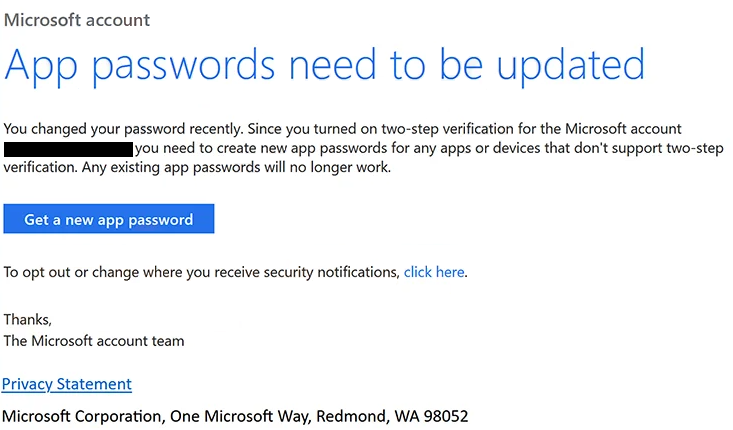
According to the email, recent security improvements or authentication changes require users to update the passwords used by email applications and connected devices. The message may claim that older credentials will soon stop working or that access from desktop mail clients and mobile devices will be blocked unless the update is completed. These statements are fabricated to create urgency and encourage recipients to follow the provided instructions.
To supposedly perform the update, the email includes a button or hyperlink labelled with phrases such as “Update App Password”, “Continue”, “Verify Now”, or “Generate New Password”. Rather than opening the official account management page of the recipient’s email provider, the link redirects users to a counterfeit login portal controlled by the attackers.
The phishing website instructs visitors to sign in using their email address and password before they can supposedly generate or update their application passwords. Some versions also request additional account information after the initial login. Instead of updating any security settings, the website captures every piece of information entered and transmits it directly to the operators of the phishing campaign.
Access to a compromised email account can expose personal correspondence, business communications, invoices, contracts, password reset emails, authentication codes, and financial information. Since email accounts often serve as the primary recovery method for numerous online services, stolen credentials may also allow attackers to gain control of additional accounts linked to the victim’s mailbox.
Unlike phishing campaigns that claim a mailbox has reached its storage limit or that suspicious login activity has been detected, the “App Passwords Need To Be Updated” phishing email exploits technical terminology that many users are unfamiliar with. Recipients who use desktop email clients or mobile mail applications may assume that updating application-specific passwords is a legitimate maintenance requirement and comply without independently verifying the request.
To make the message appear authentic, scammers often reference security upgrades, authentication improvements, synchronization changes, or updated email protocols. Some variants include fabricated deadlines or claim that connected email applications will stop functioning if no action is taken. These details are intended solely to increase the credibility of the phishing email.
Anyone who entered credentials after interacting with the “App Passwords Need To Be Updated” phishing email should immediately change the password for the affected mailbox using the official website of the email provider. If the same password has been reused on other services, those accounts should also be secured. Users should review recent login activity, verify recovery information, revoke any unfamiliar sessions or connected devices where possible, and enable legitimate multi-factor authentication through their account settings.
The full “App Passwords Need To Be Updated” phishing email is below:
Subject: Microsoft account 2FA needs updating
Microsoft account
App passwords need to be updatedYou changed your password recently. Since you turned on two-step verification for the Microsoft account -, you need to create new app passwords for any apps or devices that don’t support two-step verification. Any existing app passwords will no longer work.
[Get a new app password]
To opt out or change where you receive security notifications, [click here].
Thanks,
The Microsoft account team[Privacy Statement]
Microsoft Corporation, One Microsoft Way, Redmond, WA 98052
How to identify fake application password notifications
Unexpected emails requesting updates to application passwords should always be verified independently before any action is taken. Legitimate email providers generally allow users to manage security settings by signing in through their official website rather than requiring authentication through links contained in unsolicited emails.
Recipients should inspect the sender’s email address carefully. Phishing campaigns frequently imitate technical support departments or email administrators while using domains unrelated to the organisation they claim to represent.
Another warning sign is an email that demands immediate action while providing only vague technical explanations. Genuine service providers usually explain security changes through official account notifications and documentation rather than threatening service interruptions through unsolicited emails.
Before entering login credentials, users should verify that the website displayed in the browser’s address bar belongs to their legitimate email provider. A webpage that merely resembles the official sign-in portal should not be trusted if it is hosted on an unfamiliar domain.
The safest response is to ignore links contained in unexpected password update notifications and manually access the email account through the provider’s official website. If no corresponding notification appears after signing in, the email should be considered a phishing attempt and deleted.
Site Disclaimer
2-remove-virus.com is not sponsored, owned, affiliated, or linked to malware developers or distributors that are referenced in this article. The article does not promote or endorse any type of malware. We aim at providing useful information that will help computer users to detect and eliminate the unwanted malicious programs from their computers. This can be done manually by following the instructions presented in the article or automatically by implementing the suggested anti-malware tools.
The article is only meant to be used for educational purposes. If you follow the instructions given in the article, you agree to be contracted by the disclaimer. We do not guarantee that the artcile will present you with a solution that removes the malign threats completely. Malware changes constantly, which is why, in some cases, it may be difficult to clean the computer fully by using only the manual removal instructions.