

The “Cloud Services – Payment Declined” email is a phishing scam that attempts to mislead recipients into believing there is an issue with a payment linked to a cloud-based service. The message is typically framed as a billing notification, informing the user that a recent transaction could not be processed or that their subscription is at risk of being suspended. While this may appear to be a standard financial alert, the email is not legitimate and is sent with the intention of stealing sensitive information.
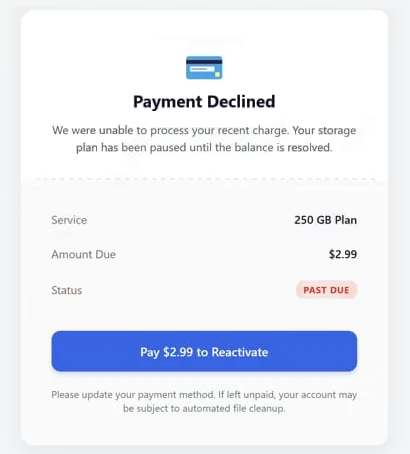
This scam relies on creating a believable situation tied to ongoing services that many users depend on. Cloud storage, hosting, and productivity platforms often require recurring payments, making a “payment declined” notice seem plausible. The “Cloud Services – Payment Declined” email usually instructs recipients to resolve the issue by updating billing information or confirming payment details through a provided link. This step is presented as necessary to prevent service interruption or account deactivation.
However, the link included in the email does not lead to a genuine service provider’s website. Instead, it directs users to a fraudulent page that mimics a legitimate login or billing portal. These pages are often designed with generic branding so they can apply to multiple cloud services, increasing the chances of success. Once on the page, users may be asked to enter login credentials, payment card details, or other personal information. Everything submitted is captured by the attackers.
The “Cloud Services – Payment Declined” scam may also include variations in wording, such as references to failed renewals, expired subscriptions, or billing errors. Some versions emphasize urgency by stating that services will be suspended within a short timeframe if the issue is not resolved. This pressure is intentional and is meant to encourage quick action without careful verification. Despite these differences, all versions follow the same pattern: present a billing issue and provide a misleading solution through a malicious link.
If the requested information is provided, the consequences can be significant. Attackers may use stolen credentials to access accounts, while payment details can be used for unauthorized transactions. In some cases, compromised accounts may be used to distribute additional phishing emails or gain access to stored data within cloud services. Because of this, interacting with the “Cloud Services – Payment Declined” email can lead to both financial loss and broader security risks.
How to recognize phishing emails
Recognizing phishing emails like the “Cloud Services – Payment Declined” scam requires careful attention to common warning signs. Although these emails are designed to appear legitimate, they often reveal themselves through patterns that are inconsistent with genuine communication.
One of the most noticeable indicators is the use of urgency. Phishing emails frequently suggest that immediate action is required to avoid negative consequences, such as service suspension or account restrictions. In this case, the message may claim that access to cloud services will be interrupted if payment details are not updated quickly. Legitimate providers typically allow more time and do not rely on unsolicited emails to enforce urgent actions.
Another important factor is the link included in the email. While it may appear to lead to a familiar service, closer inspection often shows that it points to an unrelated or suspicious domain. Hovering over the link can reveal discrepancies between the displayed text and the actual destination. This mismatch is a strong indication that the email is not genuine.
The sender’s email address should also be checked carefully. Phishing emails often imitate official addresses but include subtle differences, such as extra characters or unusual domain extensions. These variations can be easy to overlook but are a clear sign that the message did not originate from a legitimate source.
Language and formatting can provide additional clues. Some phishing emails contain grammatical errors, awkward phrasing, or inconsistent formatting. Others may appear polished but still lack specific details, such as the name of the service provider or personalized account information. Generic greetings are also common, as these emails are typically sent in large volumes.
Another warning sign is the request for sensitive information. Emails that ask users to provide login credentials, payment details, or personal data through embedded links should always be treated with caution. Legitimate cloud service providers do not request such information in this manner. Unexpected attachments, if present, should also be avoided, as they may contain malicious content.
A safer approach is to verify any billing issue independently. Instead of clicking links in the email, users should access their accounts directly through the official website of the service they use. If there is a genuine payment problem, it will be visible in the account dashboard. If not, the email can be ignored.
Being aware of these patterns is key to avoiding phishing scams. The “Cloud Services – Payment Declined” email depends on quick reactions and misplaced trust. Taking the time to review the message, question its legitimacy, and verify details independently can prevent unauthorized access and protect sensitive information.
Incoming search terms:
Site Disclaimer
2-remove-virus.com is not sponsored, owned, affiliated, or linked to malware developers or distributors that are referenced in this article. The article does not promote or endorse any type of malware. We aim at providing useful information that will help computer users to detect and eliminate the unwanted malicious programs from their computers. This can be done manually by following the instructions presented in the article or automatically by implementing the suggested anti-malware tools.
The article is only meant to be used for educational purposes. If you follow the instructions given in the article, you agree to be contracted by the disclaimer. We do not guarantee that the artcile will present you with a solution that removes the malign threats completely. Malware changes constantly, which is why, in some cases, it may be difficult to clean the computer fully by using only the manual removal instructions.