

The “cPanel – Automated Storage Report” phishing email is a credential-stealing scam that impersonates cPanel. It presents recipients with a fabricated storage warning and attempts to convince them that their mailbox is almost full and requires immediate synchronization.
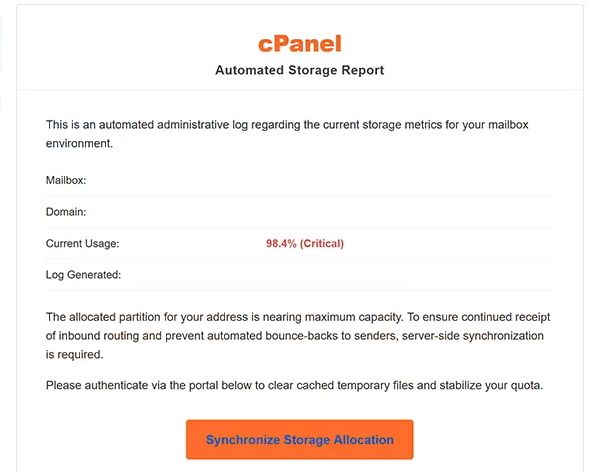
The email uses the subject “Notification” and presents itself as an automated administrative storage report. It includes fields for the recipient’s mailbox and domain and claims that current mailbox usage has reached 98.4%, which it marks as “Critical”.
According to the warning, the allocated storage partition is approaching its maximum capacity. The email claims this could interfere with incoming mail and cause messages to bounce back to their senders unless the recipient takes action.
To supposedly prevent these problems, recipients are instructed to authenticate through a provided portal. The email says this process will clear cached temporary files, stabilize the mailbox quota, and maintain normal mail operation. The button provided for this purpose is labeled “Synchronize Storage Allocation”.
These claims are false. Selecting the button opens a fraudulent Webmail login page rather than a legitimate cPanel storage management interface. The phishing site is hosted using Firebase Storage, a legitimate Google Cloud service that is being misused to host the fake page.
The fraudulent page closely imitates the cPanel Webmail login interface. It displays cPanel branding and includes a language selection menu to make the page appear more convincing. Visitors are asked to enter their email address and password.
Credentials submitted through this form are sent to the scammers operating the campaign. Synchronizing mailbox storage does not occur, and entering login details does not increase available storage or prevent incoming emails from bouncing.
Access to a compromised email account can provide scammers with sensitive information and may also allow them to target other accounts connected to the email address. Anyone who has entered credentials on the fake Webmail page should change the affected password promptly and replace it anywhere else it has been reused.
cPanel, L.L.C. is not involved in the campaign. Its name and branding are being used without authorization to make the fabricated storage report and phishing page appear legitimate.
The full “cPanel – Automated Storage Report” phishing email is below:
Subject: Notification
cPanel
Automated Storage ReportThis is an automated administrative log regarding the current storage metrics for your mailbox environment.
Mailbox:
Domain:
Current Usage: 98.4% (Critical)
Log Generated:The allocated partition for your address is nearing maximum capacity. To ensure continued receipt of inbound routing and prevent automated bounce-backs to senders, server-side synchronization is required.
Please authenticate via the portal below to clear cached temporary files and stabilize your quota.
[Synchronize Storage Allocation]Notice ID: | Routing Protocol: Active
This system log was generated automatically by the server daemon. Manual intervention is required to maintain active mail protocols. If you do not manage the infrastructure for -, contact your local network administrator.
This is a post-only mailing address. Replies to this message are routed to an unmonitored null device.
© 2026 cPanel, L.L.C. operating for -. All rights reserved.
How to recognize phishing emails
The unusually precise storage warning is an important characteristic of the “cPanel – Automated Storage Report” phishing email. Rather than simply claiming that a mailbox is full, it states that usage has reached exactly 98.4% and labels the situation as critical.
The email also uses technical terminology to make its claims sound credible. It refers to an allocated partition, inbound routing, server-side synchronization, cached temporary files, active mail protocols, and a server daemon. These terms are presented as justification for directing the recipient to the “Synchronize Storage Allocation” button.
Recipients should not assume that detailed technical language or specific figures prove that a storage report is genuine. An unexpected mailbox warning can be checked directly through the hosting provider’s legitimate control panel without using a link supplied in an email.
The login page reached through the button provides another reason for caution. In this campaign, recipients are taken to a cPanel-style Webmail page hosted through Firebase Storage. The presence of cPanel logos and a familiar-looking login form does not mean that the page belongs to cPanel or the recipient’s hosting provider.
Checking the actual address displayed in the browser is therefore important. A phishing page can reproduce logos, forms, menus, and other visual elements while being hosted somewhere unrelated to the company it impersonates.
The request for an email address and password should also be considered in context. The original email claims that storage must be synchronized, but following its instructions ultimately results in a request for Webmail credentials on a fraudulent page.
Recipients who genuinely need to check mailbox storage can sign in to their hosting account or Webmail service independently rather than clicking “Synchronize Storage Allocation” in the email.
Site Disclaimer
2-remove-virus.com is not sponsored, owned, affiliated, or linked to malware developers or distributors that are referenced in this article. The article does not promote or endorse any type of malware. We aim at providing useful information that will help computer users to detect and eliminate the unwanted malicious programs from their computers. This can be done manually by following the instructions presented in the article or automatically by implementing the suggested anti-malware tools.
The article is only meant to be used for educational purposes. If you follow the instructions given in the article, you agree to be contracted by the disclaimer. We do not guarantee that the artcile will present you with a solution that removes the malign threats completely. Malware changes constantly, which is why, in some cases, it may be difficult to clean the computer fully by using only the manual removal instructions.