

The “cPanel Webmail – Action Required” email scam is a phishing campaign designed to steal email account credentials. The email impersonates a cPanel-related notification and claims that the recipient must complete an urgent action affecting their webmail account. The message attempts to create a sense of urgency by warning that failure to respond may result in account restrictions, service disruptions, or the inability to access email services.
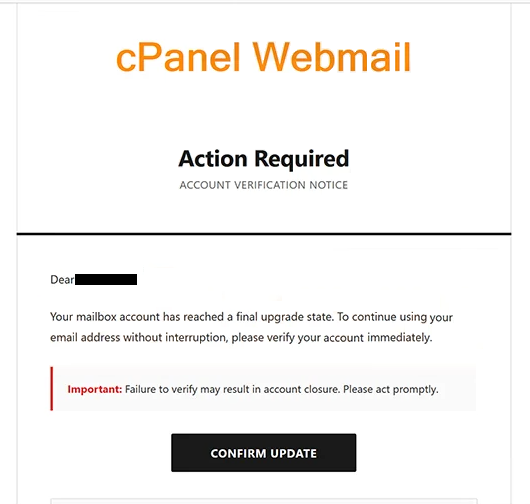
Recipients of the “cPanel Webmail – Action Required” email are informed that their webmail account requires attention due to a pending update, account verification procedure, security requirement, or service-related change. The exact wording may vary, but the objective remains the same: convincing recipients that immediate action is necessary to maintain access to their email account.
The email typically contains a button or hyperlink that supposedly allows users to complete the required action. However, the provided link does not lead to a legitimate cPanel portal. Instead, it redirects users to a phishing website designed to mimic a genuine login page. The fraudulent website requests email credentials under the pretense of verifying the account or completing the required process.
Once credentials are entered, they are transmitted directly to the cybercriminals operating the phishing campaign. The attackers can then access the compromised email account and potentially use it for various malicious purposes. Since email accounts often contain sensitive communications and serve as recovery channels for other online services, unauthorized access can have serious consequences.
A compromised mailbox may allow attackers to review private conversations, obtain sensitive information, access password reset messages, impersonate the account owner, or conduct further phishing attacks using the victim’s email address. Business email accounts can be particularly valuable targets because they may contain corporate information, financial records, customer communications, or internal documents.
The “cPanel Webmail – Action Required” scam relies heavily on urgency to increase the likelihood of success. The email often states that action must be taken immediately or within a limited period. By creating pressure, the scammers attempt to prevent recipients from carefully evaluating the legitimacy of the message before interacting with it.
To appear credible, the phishing email may include cPanel branding, administrative language, support-related terminology, or references to account maintenance procedures. These elements are intended to make the notification resemble a legitimate service message rather than a phishing attempt.
Unlike generic phishing campaigns that simply request login credentials, the “cPanel Webmail – Action Required” scam specifically targets users who manage email services through cPanel or web hosting environments. This targeted approach can make the email appear more relevant and convincing to potential victims.
The email may also claim that the requested action is necessary to prevent mailbox suspension, maintain service availability, improve account security, or complete a system upgrade. Such claims are designed to encourage recipients to comply with the instructions without independently verifying the request.
Anyone who entered credentials into a website linked from the “cPanel Webmail – Action Required” email should immediately change the affected password. If the same password is used on other accounts, those accounts should also be secured. Users should additionally review account activity for signs of unauthorized access and update recovery information if necessary.
The full “cPanel Webmail – Action Required” phishing email is below:
Subject: – Service – Account Update Requirment
cPanel Webmail
Action Required
Account Verification Notice
Dear -,
Your mailbox account has reached a final upgrade state. To continue using your email address without interruption, please verify your account immediately.
Important: Failure to verify may result in account closure. Please act promptly.
[Confirm Update]
If the button doesn’t work, copy and paste this link into your browserThank you for choosing –
Mail Support Team
Please do not reply to this email. This is an automated message
How to recognize phishing emails
Phishing campaigns such as the “cPanel Webmail – Action Required” scam often imitate legitimate service notifications to obtain sensitive information. Recognizing common warning signs can help prevent account compromise.
One important indicator is an unsolicited request to verify, update, or secure an account through a link embedded in an email. While legitimate providers may occasionally send account-related notifications, unexpected emails demanding immediate action should always be treated cautiously.
The sender’s address should be examined carefully. Phishing emails frequently use display names that appear legitimate while the actual sending address belongs to an unrelated domain. Reviewing the full sender information can often reveal inconsistencies.
Links contained within phishing emails should also be treated with caution. The “cPanel Webmail – Action Required” scam relies on directing users to a counterfeit login page. Hovering over links before clicking can help reveal suspicious destinations that do not belong to the expected organization.
Another common warning sign is the use of urgency. Messages claiming that an account will be suspended, disabled, restricted, or otherwise affected unless immediate action is taken are frequently associated with phishing campaigns.
Users should also be cautious whenever an email requests login credentials through an external webpage. Legitimate account management can generally be performed by visiting the official website directly rather than following links contained in unsolicited messages.
The safest response to suspicious account-related notifications is to avoid clicking links within the email. Instead, users should manually navigate to the official cPanel or hosting provider login page and check whether any corresponding alerts are present within the account itself.
Site Disclaimer
2-remove-virus.com is not sponsored, owned, affiliated, or linked to malware developers or distributors that are referenced in this article. The article does not promote or endorse any type of malware. We aim at providing useful information that will help computer users to detect and eliminate the unwanted malicious programs from their computers. This can be done manually by following the instructions presented in the article or automatically by implementing the suggested anti-malware tools.
The article is only meant to be used for educational purposes. If you follow the instructions given in the article, you agree to be contracted by the disclaimer. We do not guarantee that the artcile will present you with a solution that removes the malign threats completely. Malware changes constantly, which is why, in some cases, it may be difficult to clean the computer fully by using only the manual removal instructions.