

The “cPanel – Your email quota has reached 98%” email scam is a phishing email designed to trick recipients into surrendering their email account credentials. The message claims that the recipient’s mailbox is almost full and warns that email functionality may be affected if immediate action is not taken. These claims are false and are intended solely to direct users to a credential-harvesting website.
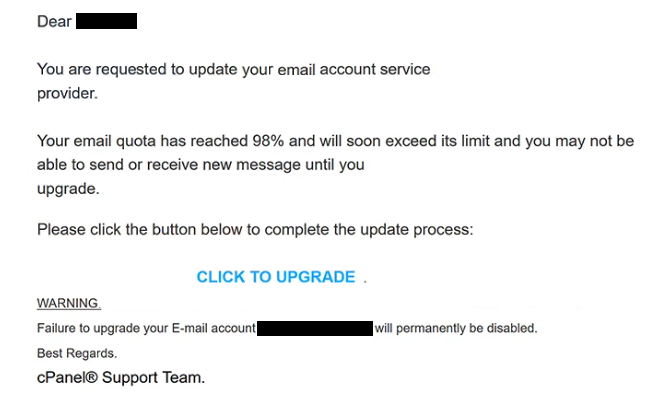
The email typically states that the mailbox has reached 98% of its allocated storage capacity and that only a limited amount of space remains available. According to the message, incoming emails may soon stop arriving, pending messages may not be delivered, or account services may become unavailable. The notification presents the situation as urgent and requires the recipient to resolve the issue immediately.
To supposedly prevent disruption, the email instructs recipients to click a button that promises to increase storage capacity, release held messages, refresh mailbox limits, or keep the account active. Rather than directing users to a legitimate cPanel or webmail management page, the link opens a fraudulent website controlled by scammers.
The phishing website is designed to resemble a legitimate email login portal. Visitors are asked to sign in using their email address and password to confirm ownership of the mailbox or complete the storage upgrade process. Any credentials entered into the form are sent directly to the attackers.
Once cybercriminals obtain access to an email account, they may attempt to misuse it in several ways. Email accounts often contain personal conversations, invoices, contracts, password reset requests, account verification messages, and other sensitive information. Access to a mailbox can also provide opportunities to compromise additional accounts associated with the same email address.
The “cPanel – Your email quota has reached 98%” scam specifically exploits concerns about communication disruptions. Unlike phishing campaigns that focus on security incidents or account suspensions, this scam centers on the possibility of missing important emails. This approach can be effective because many users rely on email for work, customer communication, online services, and financial activities.
To make the notification appear authentic, the scammers may include mailbox statistics, storage percentages, quota information, server references, or support-related terminology. Some versions claim that messages are already being delayed due to insufficient storage space. These details are intended to create the impression that the warning originated from a legitimate hosting provider or email administrator.
The message may also contain professional formatting, logos, icons, and administrative language commonly associated with email management systems. However, visual appearance alone should never be used to determine whether an email is legitimate.
Unlike genuine mailbox notifications, the “cPanel – Your email quota has reached 98%” email attempts to obtain credentials through an external login page. The storage warning serves only as a pretext to convince users to visit the phishing website and disclose their account information.
Anyone who submitted login credentials through a page linked from the “cPanel – Your email quota has reached 98%” email should change the affected password immediately. If the same password is used on other services, those accounts should also be secured without delay.
The full “cPanel – Your email quota has reached 98%” phishing email is below:
Subject: Update Email Account
Dear –
You are requested to update your email account service provider.
Your email quota has reached 98% and will soon exceed its limit and you may not be able to send or receive new message until you upgrade.
Please click the button below to complete the update process:
[CLICK TO UPGRADE]
WARNING.
Failure to upgrade your E-mail account – will permanently be disabled.
Best Regards.
cPanel® Support Team.
© 2026 cPanel. All Rights Reserved.
Signs that the email is fraudulent
One of the clearest indicators is the request to resolve a mailbox quota issue through a link embedded directly in the email. Legitimate mailbox storage can typically be reviewed by signing in to the email account through official channels rather than through unsolicited links.
Another warning sign is the emphasis on urgency. The email may claim that email delivery will stop soon or that messages are already being blocked. These warnings are designed to encourage immediate action instead of careful verification.
Recipients should also inspect the sender’s email address. Phishing emails often imitate support teams, hosting providers, or system administrators while originating from unrelated domains that have no connection to the claimed organization.
The destination of any included links should be reviewed carefully. Fraudulent emails commonly direct users to websites that imitate legitimate login portals while using unrelated domain names. The appearance of a familiar login page does not guarantee that the site is genuine.
Users should be especially cautious whenever an email requests credentials to resolve a storage-related issue. Increasing mailbox capacity, reviewing storage usage, and managing account settings can normally be performed through the official webmail or hosting control panel after navigating there directly.
The safest way to verify a quota warning is to manually sign in to the official webmail account or hosting portal and check storage usage from within the account dashboard. If no corresponding notification is present, the email should be treated as suspicious.
The “cPanel – Your email quota has reached 98%” email scam relies on a simple but effective tactic: convincing recipients that access to future emails is at risk. By understanding how these phishing emails operate and by avoiding login requests delivered through unsolicited messages, users can significantly reduce the risk of credential theft and account compromise.
Incoming search terms:
Site Disclaimer
2-remove-virus.com is not sponsored, owned, affiliated, or linked to malware developers or distributors that are referenced in this article. The article does not promote or endorse any type of malware. We aim at providing useful information that will help computer users to detect and eliminate the unwanted malicious programs from their computers. This can be done manually by following the instructions presented in the article or automatically by implementing the suggested anti-malware tools.
The article is only meant to be used for educational purposes. If you follow the instructions given in the article, you agree to be contracted by the disclaimer. We do not guarantee that the artcile will present you with a solution that removes the malign threats completely. Malware changes constantly, which is why, in some cases, it may be difficult to clean the computer fully by using only the manual removal instructions.