

The “Delivery Status Summary” phishing email attempts to steal email login credentials by presenting an attached HTML file as an automated delivery report. The email pretends to originate from an “Email Delivery Monitoring System” and suggests that the recipient should examine a report concerning their email configuration. The attachment does not contain a legitimate delivery report. Instead, opening it displays a fake Gmail login page intended to collect credentials.
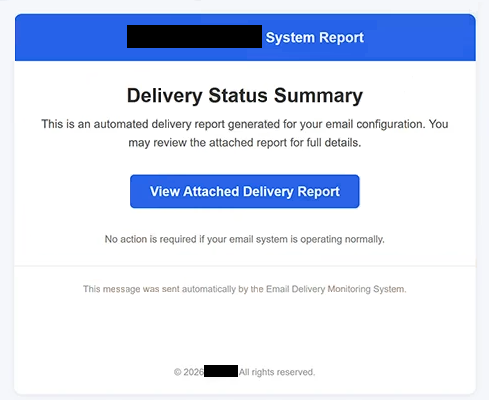
The email has the subject “Pending Orders & Payment Actions -.” Its body contains the heading “Delivery Status Summary” and states that an automated delivery report has been generated for the recipient’s email configuration. Recipients are encouraged to review the attached report for additional details.
A notable part of this campaign is the “View Attached Delivery Report” button displayed inside the email. Although it appears to provide access to the supposed report, the button itself is non-functional. The actual phishing content is contained in an HTML file attached to the email.
Opening the HTML attachment causes a web browser to display a locally loaded phishing page. This page imitates Gmail’s sign-in interface and contains the heading “Verify Email Address.” It asks the recipient to provide an email address and password. The email address may already appear in the form, which can make the page seem more personalized and convincing.
Information submitted through this form is captured by the scammers. Entering credentials does not display a genuine delivery report or provide information about the recipient’s email configuration.
Google is not associated with the campaign. Gmail’s appearance is copied solely to make the credential request look familiar. If scammers obtain valid email credentials, they may gain access to private messages and use the compromised mailbox to reset passwords for other services connected to the same email address.
The full “Delivery Status Summary” phishing email is below:
Subject: Pending Orders & Payment Actions – –
– System Report
Delivery Status Summary
This is an automated delivery report generated for your email configuration. You may review the attached report for full details.
[View Attached Delivery Report]No action is required if your email system is operating normally.
This message was sent automatically by the Email Delivery Monitoring System.© 2026 -. All rights reserved.
How to recognize the “Delivery Status Summary” phishing email
The way the supposed report is delivered is particularly important when identifying this phishing email. The message creates the impression that the recipient needs to review an email delivery report, yet the visible “View Attached Delivery Report” button does nothing. The recipient must instead open the attached HTML file to reach the content the scammers want them to see.
HTML attachments deserve careful examination because they can open interactive content directly in a browser. In this case, the attachment does not need to redirect the recipient to a conventional phishing URL before displaying the fake login form. It loads the Gmail-style page from the local HTML file.
The request to “Verify Email Address” is another clear indication of the scam. A report supposedly concerning email delivery should not require the recipient to submit their mailbox password through an HTML attachment received in an unexpected email.
The subject line also deserves scrutiny. “Pending Orders & Payment Actions -” introduces orders and payment actions, while the email itself discusses an automated email delivery report. This mismatch provides another reason to question the message.
Recipients should avoid opening the HTML attachment and should not provide credentials through the displayed form. If there is concern about an actual email delivery problem, the mailbox or email administration service should be accessed independently rather than through the attachment.
Anyone who has already entered an email address and password into the fake Gmail page should change the affected password through the legitimate email provider. Passwords reused on other accounts should also be changed, and the mailbox should be checked for unauthorized access.
The “Delivery Status Summary” phishing email specifically relies on an attached HTML file that opens a fake Gmail interface requesting an email address and password. The visible “View Attached Delivery Report” button is non-functional; the attachment itself contains the credential-stealing page.
Site Disclaimer
2-remove-virus.com is not sponsored, owned, affiliated, or linked to malware developers or distributors that are referenced in this article. The article does not promote or endorse any type of malware. We aim at providing useful information that will help computer users to detect and eliminate the unwanted malicious programs from their computers. This can be done manually by following the instructions presented in the article or automatically by implementing the suggested anti-malware tools.
The article is only meant to be used for educational purposes. If you follow the instructions given in the article, you agree to be contracted by the disclaimer. We do not guarantee that the artcile will present you with a solution that removes the malign threats completely. Malware changes constantly, which is why, in some cases, it may be difficult to clean the computer fully by using only the manual removal instructions.