

The “Security Alert: Sign-In Attempt Blocked” phishing email impersonates a cPanel Webmail security notification and attempts to steal email account credentials. It falsely claims that somebody recently tried to access the recipient’s account and that the login attempt was blocked. The supposed security incident is used to create urgency and persuade the recipient to follow instructions provided in the email.
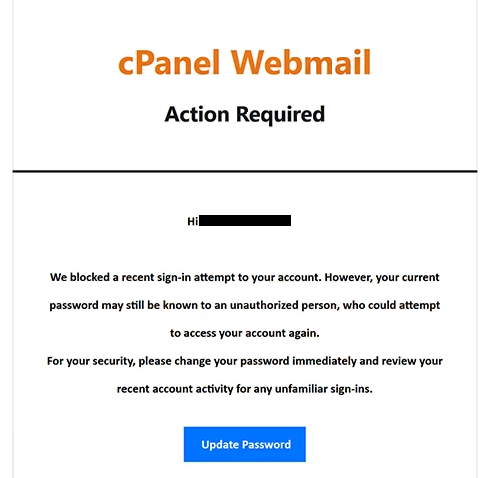
The email uses the subject line “Security Alert: Sign-In Attempt Blocked” and presents itself as a notification from an “Account Security Team.” According to the warning, an unauthorized sign-in attempt was recently detected and prevented. However, the email suggests that the person responsible may already know the recipient’s password and could attempt to access the account again.
To supposedly protect the mailbox, recipients are advised to change their password immediately and review account activity for suspicious logins. The “Security Alert: Sign-In Attempt Blocked” phishing email provides an “Update Password” button that appears to offer a convenient way to secure the account.
The button does not lead to a legitimate cPanel account-management service. The campaign is designed to obtain login credentials rather than help recipients secure their email accounts.
cPanel, L.L.C. is not associated with this campaign. Its name and Webmail-related terminology are used to make the “Security Alert: Sign-In Attempt Blocked” phishing email appear to be a legitimate account security warning.
If scammers obtain valid credentials through a phishing page, they can potentially access the corresponding mailbox. This can expose emails and other information available through the account. A compromised mailbox can also be used to impersonate its owner or target other services connected to the email address through password-recovery functions.
The full “Security Alert: Sign-In Attempt Blocked” phishing email is below:
Subject: Security Alert: Sign-In Attempt Blocked
cPanel Webmail
Action RequiredHi -,
We blocked a recent sign-in attempt to your account. However, your current password may still be known to an unauthorized person, who could attempt to access your account again.
For your security, please change your password immediately and review your recent account activity for any unfamiliar sign-ins.[Update Passwогd]
© 2026 – Webmail Support Automated Message.
Copyright © 2026 cPanel, L.L.C. Privacy Policy
How to recognize the “Security Alert: Sign-In Attempt Blocked” phishing email
The “Security Alert: Sign-In Attempt Blocked” phishing email creates concern by combining two claims: that an unauthorized login has already occurred and that the person responsible may know the recipient’s password. This encourages recipients to react quickly instead of independently verifying the warning.
Users who receive this email should not use the supplied “Update Password” button to investigate the alleged activity. If there is concern about the security of a cPanel or Webmail account, the service should be accessed independently through the legitimate hosting provider or the webmail address normally used by the account owner.
The complete sender address should also be examined. A subject such as “Security Alert: Sign-In Attempt Blocked,” references to an “Account Security Team,” and cPanel-related terminology do not establish that the email actually originated from cPanel or the recipient’s hosting provider.
Users should also verify the destination of buttons before entering account information. Because the website associated with this particular campaign was unavailable during analysis, its exact contents cannot be confirmed. What can be confirmed is that the email is a phishing attempt and that its account-security claims should not be trusted.
Simply receiving or opening the “Security Alert: Sign-In Attempt Blocked” phishing email does not disclose the recipient’s password. Users who have not submitted credentials through the supplied destination should avoid further interaction and delete the email.
Incoming search terms:
Site Disclaimer
2-remove-virus.com is not sponsored, owned, affiliated, or linked to malware developers or distributors that are referenced in this article. The article does not promote or endorse any type of malware. We aim at providing useful information that will help computer users to detect and eliminate the unwanted malicious programs from their computers. This can be done manually by following the instructions presented in the article or automatically by implementing the suggested anti-malware tools.
The article is only meant to be used for educational purposes. If you follow the instructions given in the article, you agree to be contracted by the disclaimer. We do not guarantee that the artcile will present you with a solution that removes the malign threats completely. Malware changes constantly, which is why, in some cases, it may be difficult to clean the computer fully by using only the manual removal instructions.