

The “DHL Express Shipment Update” phishing email is a fraudulent message that impersonates DHL Express to convince recipients that there has been an update regarding a shipment. The email encourages users to review delivery information, shipment details, or package status by selecting a button or hyperlink. Instead of providing legitimate tracking information, the message is designed to redirect recipients to a phishing website that collects sensitive information.
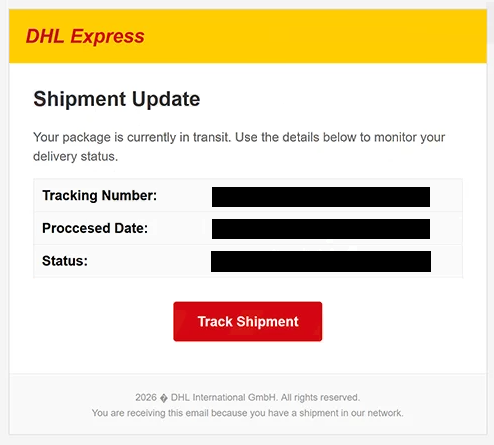
The email usually informs the recipient that important shipment information is available or that a package requires attention before delivery can continue. Depending on the version of the campaign, it may reference updated tracking details, shipping documents, delivery confirmation, or package processing. The notification attempts to create the impression that prompt action is necessary to avoid delays.
Recipients who click the provided button are not taken to DHL’s official website. Instead, they are redirected to a counterfeit webpage designed to imitate a DHL-related portal or an email sign-in page. The fraudulent site commonly requests the visitor’s email address and password under the pretense of granting access to shipment information or verifying identity.
Submitting credentials on the phishing page does not reveal any package details. Instead, the information entered into the form is transmitted directly to the operators of the phishing campaign. Stolen email credentials may subsequently be used to access the victim’s mailbox, search for confidential information, or attempt to compromise other online accounts linked to the same email address.
Email accounts often contain invoices, contracts, password reset messages, financial notifications, authentication codes, and business correspondence. Because email addresses frequently serve as the primary recovery method for online services, unauthorized access to a mailbox may enable attackers to reset passwords for additional accounts belonging to the victim.
Unlike phishing campaigns that focus on account suspension or password expiration, the “DHL Express Shipment Update” phishing email exploits recipients’ expectation of parcel deliveries. Many users regularly receive shipment notifications from courier companies, making package-related messages particularly effective at encouraging recipients to interact with embedded links.
To increase credibility, the email may include DHL branding, shipment reference numbers, tracking identifiers, or delivery-related terminology. These elements are intended to make the notification resemble an authentic shipping update but do not indicate that the message originated from DHL.
Anyone who entered credentials through a website linked from the “DHL Express Shipment Update” phishing email should immediately change the password for the affected email account. If the same password has been reused elsewhere, it should also be replaced on those accounts. Users should additionally review recent account activity for signs of unauthorized access.
The full “DHL Express Shipment Update” phishing email is below:
Subject: DHL Express Shipment Update: –
DHL Express
Shipment UpdateYour package is currently in transit. Use the details below to monitor your delivery status.
Tracking Number: –
Proccesed Date: –
Status: –
[Track Shipment]2026 DHL International GmbH. All rights reserved.
You are receiving this email because you have a shipment in our network.
How to identify fake DHL shipment notifications
Unexpected shipment emails should be treated cautiously, especially if the recipient is not expecting a package or the message requests that they sign in through an embedded link. Legitimate shipment tracking can be verified by visiting the courier’s official website directly and entering the tracking number instead of following links contained in unsolicited emails.
The sender’s email address should also be examined carefully. Phishing campaigns frequently use display names associated with DHL while sending messages from unrelated domains that have no connection to the company.
Another warning sign is a request to log in with an email account simply to access shipment information. Courier companies generally provide package tracking through tracking numbers rather than requiring recipients to disclose email account credentials.
Recipients should also inspect the destination of embedded links before opening them. A page requesting login credentials on a domain unrelated to DHL should be regarded as suspicious, regardless of how closely it resembles the company’s website.
If there is any doubt about the authenticity of a shipment notification, the safest approach is to ignore the links in the email and manually visit DHL’s official website to check the shipment status. If no matching delivery information is available, the email should be treated as a phishing attempt.
Incoming search terms:
Site Disclaimer
2-remove-virus.com is not sponsored, owned, affiliated, or linked to malware developers or distributors that are referenced in this article. The article does not promote or endorse any type of malware. We aim at providing useful information that will help computer users to detect and eliminate the unwanted malicious programs from their computers. This can be done manually by following the instructions presented in the article or automatically by implementing the suggested anti-malware tools.
The article is only meant to be used for educational purposes. If you follow the instructions given in the article, you agree to be contracted by the disclaimer. We do not guarantee that the artcile will present you with a solution that removes the malign threats completely. Malware changes constantly, which is why, in some cases, it may be difficult to clean the computer fully by using only the manual removal instructions.