

The “Domain restoration needed urgently” phishing email is a fraudulent message that attempts to steal email account credentials by claiming that the recipient’s domain or domain-related email services require immediate restoration. The email warns that failure to take prompt action could result in interrupted email communication or loss of domain functionality. These claims are false and are used to lure recipients to a phishing website.
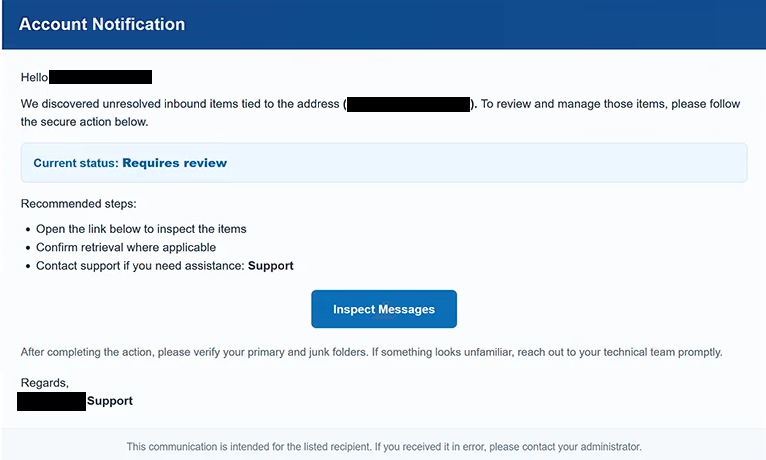
The message typically states that the recipient’s domain has encountered a critical issue requiring immediate administrative attention. It may claim that essential domain services have been suspended, that email routing has been disrupted, or that the domain is at risk of becoming unavailable. To create pressure, the email emphasizes that restoration must be completed within a limited time.
Recipients are instructed to click a button or hyperlink to begin the alleged restoration process. Rather than opening a legitimate hosting provider or domain registrar portal, the link redirects users to a phishing website designed to resemble an email administration interface or webmail login page.
The fraudulent website asks visitors to enter their email address and password, claiming that authentication is required before domain services can be restored. No restoration takes place. Instead, every credential submitted through the form is transmitted directly to the operators of the phishing campaign.
Email account credentials can provide attackers with access to sensitive information stored in the compromised mailbox, including business correspondence, invoices, contracts, password reset emails, authentication codes, and financial notifications. Because email accounts are frequently connected to numerous online services, compromising a mailbox may also enable attackers to target additional accounts associated with the same email address.
Unlike phishing campaigns that rely on password expiration notices or mailbox storage warnings, the “Domain restoration needed urgently” phishing email exploits concerns about domain availability and business continuity. Organizations that rely on custom email domains may be particularly inclined to respond quickly because they wish to avoid service interruptions.
To make the notification appear authentic, the email commonly includes technical terminology associated with domain administration, DNS services, email hosting, or account management. It may also impose an artificial deadline, claiming that restoration must be completed immediately to prevent permanent disruption. These urgency tactics are intended to discourage recipients from independently verifying the legitimacy of the request.
Anyone who entered credentials through a website linked from the “Domain restoration needed urgently” phishing email should immediately change the password for the affected mailbox. If the same password has been reused elsewhere, those accounts should also be secured. Users should additionally review recent account activity and recovery information for unauthorized changes.
The full “Domain restoration needed urgently” phishing email is below:
Subject: Domain restoration needed urgently
Account Notification
Hello -,
We discovered unresolved inbound items tied to the address ( – ). To review and manage those items, please follow the secure action below.
Current status: Requires reviewRecommended steps:
Open the link below to inspect the items
Confirm retrieval where applicable
Contact support if you need assistance: Support[Inspect Messages]
After completing the action, please verify your primary and junk folders. If something looks unfamiliar, reach out to your technical team promptly.
Regards,
– Support
This communication is intended for the listed recipient. If you received it in error, please contact your administrator.
How to identify fake domain restoration emails
Unexpected notifications claiming that a domain requires urgent restoration should be verified independently before any action is taken. Legitimate domain registrars and hosting providers generally allow customers to review domain status by signing in through their official account management portals rather than requesting authentication through links embedded in unsolicited emails.
Recipients should carefully inspect the sender’s email address. Phishing campaigns frequently imitate hosting providers or technical support departments while using domains unrelated to the organizations they claim to represent.
Another warning sign is the use of vague technical language without identifying the specific domain, hosting plan, or service allegedly affected. Legitimate service providers usually include detailed account information rather than generic statements about urgent restoration.
Before entering login credentials, users should verify the destination website. If the email redirects to an unfamiliar domain requesting mailbox credentials, the page should be regarded as suspicious regardless of how closely it resembles a legitimate hosting or webmail portal.
The safest approach is to ignore links contained in unexpected domain management notifications and instead access the hosting provider or domain registrar directly by manually entering its official website address into a browser. If no corresponding alert appears after signing in, the email should be considered a phishing attempt.
Incoming search terms:
Site Disclaimer
2-remove-virus.com is not sponsored, owned, affiliated, or linked to malware developers or distributors that are referenced in this article. The article does not promote or endorse any type of malware. We aim at providing useful information that will help computer users to detect and eliminate the unwanted malicious programs from their computers. This can be done manually by following the instructions presented in the article or automatically by implementing the suggested anti-malware tools.
The article is only meant to be used for educational purposes. If you follow the instructions given in the article, you agree to be contracted by the disclaimer. We do not guarantee that the artcile will present you with a solution that removes the malign threats completely. Malware changes constantly, which is why, in some cases, it may be difficult to clean the computer fully by using only the manual removal instructions.