

The Email Deliverability Notice scam is a phishing campaign designed to trick recipients into believing there is a serious issue affecting their email account. The message usually claims that outgoing or incoming emails are failing to reach recipients due to security problems, authentication errors, spam detection, or mailbox restrictions. Although the notification may appear urgent and professional, it is fraudulent and intended to steal login credentials or expose users to malicious websites.
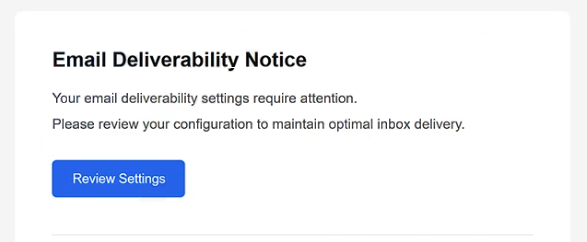
Most versions of the Email Deliverability Notice scam pretend to come from an email provider, administrator, or security department. The email commonly warns that certain messages have been blocked, rejected, or delayed because the account allegedly violated delivery policies or triggered spam filters. In some cases, the scam claims that email functionality will soon be suspended unless the issue is resolved immediately.
To supposedly restore normal email activity, recipients are instructed to click a button or follow a link included in the message. However, instead of opening a legitimate mailbox management portal, the link redirects users to a phishing page designed to imitate an email login website. These fake portals are created to steal usernames and passwords entered by unsuspecting victims. Similar scams frequently rely on counterfeit login pages to capture email credentials.
The Email Deliverability Notice scam takes advantage of how dependent many people are on email communication. Warnings involving blocked messages, failed deliveries, or restricted accounts can create panic because users fear losing access to important personal or work-related correspondence. Attackers exploit this concern to pressure recipients into reacting quickly instead of carefully verifying the legitimacy of the message.
Once attackers obtain access to an email account, they may misuse it in several ways. Compromised accounts can be used to distribute additional phishing emails, search for sensitive information, reset passwords connected to other services, or impersonate the victim in communication with contacts. Since email accounts are commonly linked to banking, cloud storage, shopping, and workplace platforms, a single compromise may expose multiple services.
Another reason the Email Deliverability Notice scam remains effective is its broad targeting strategy. The message often avoids mentioning a specific provider directly, allowing the same phishing template to target users across different email platforms. Generic wording related to spam activity, delivery failures, or authentication issues helps attackers distribute the campaign widely without requiring personalization.
Some variants of the scam include technical references such as SPF, DMARC, mailbox synchronization, or spam-filter violations to appear more convincing. Others imitate corporate branding and professional formatting to create the impression that the notification originated from a legitimate email service provider. Despite these differences, the primary objective remains the same: obtaining sensitive information through deception.
The full “Email Deliverability Notice” phishing email is below:
Subject: Email Deliverability Notice
Email Deliverability Notice
Your email deliverability settings require attention.
Please review your configuration to maintain optimal inbox delivery.[Review Settings]
This notification was sent automatically by the Mail Security & Deliverability Server.
Please do not reply directly to this message.© 2026 Mail Infrastructure Services. All rights reserved.
Unsubscribe
How to recognize phishing emails
Recognizing phishing campaigns like the Email Deliverability Notice scam requires paying close attention to warning signs commonly found in fraudulent account notifications. While these emails are designed to appear believable, they often contain inconsistencies that reveal their true purpose.
One of the strongest warning signs is urgency. Phishing emails commonly claim that immediate action is necessary to avoid account restrictions, lost emails, or mailbox suspension. In this case, the message may warn that email delivery has failed or that messages are being blocked. This pressure is intentional and is meant to encourage impulsive reactions instead of careful verification.
The sender’s address should also be inspected carefully. Fraudulent emails often imitate technical support teams or email providers while using suspicious domains, unrelated addresses, or slight spelling variations. Even when the sender’s name appears professional, the actual email address may reveal that the message did not originate from a legitimate organization.
Links embedded in phishing emails are another major indicator. While the visible text may appear trustworthy, hovering over the link often reveals a suspicious or unrelated destination. These links commonly lead to fake login portals specifically created to steal usernames and passwords. Security researchers frequently identify phishing campaigns that rely on counterfeit email sign-in pages.
The wording and formatting used in phishing emails can also provide clues. Some messages contain grammatical mistakes, awkward phrasing, or inconsistent formatting. Others appear polished but still rely heavily on generic warnings and vague explanations regarding delivery problems or authentication issues. Research on phishing behavior has shown that users are often manipulated through urgency and authority-based language.
Requests for passwords or account verification through external links should always raise suspicion. Legitimate providers generally encourage users to access account settings directly through official websites rather than through unsolicited links in emails.
Unexpected attachments should also be approached carefully. Some phishing emails include files disguised as delivery reports, security logs, or failed-message summaries. Opening these attachments may expose devices to malware if they contain malicious scripts or executable files.
A safer approach is to avoid interacting with suspicious emails directly. Instead of clicking links inside the message, users should manually access their email provider’s official website and review account notifications there. If no matching alert appears within the account itself, the email is likely fraudulent.
Site Disclaimer
2-remove-virus.com is not sponsored, owned, affiliated, or linked to malware developers or distributors that are referenced in this article. The article does not promote or endorse any type of malware. We aim at providing useful information that will help computer users to detect and eliminate the unwanted malicious programs from their computers. This can be done manually by following the instructions presented in the article or automatically by implementing the suggested anti-malware tools.
The article is only meant to be used for educational purposes. If you follow the instructions given in the article, you agree to be contracted by the disclaimer. We do not guarantee that the artcile will present you with a solution that removes the malign threats completely. Malware changes constantly, which is why, in some cases, it may be difficult to clean the computer fully by using only the manual removal instructions.