

The “IP Blacklist Warning” email scam is a phishing campaign that impersonates a cPanel or hosting-related security notification. The message claims that the recipient’s IP address has been added to an email blacklist and warns that this issue may affect email delivery, domain reputation, or account functionality. The purpose of the email is not to help resolve any blacklist problem but to steal account credentials through a fraudulent verification process.
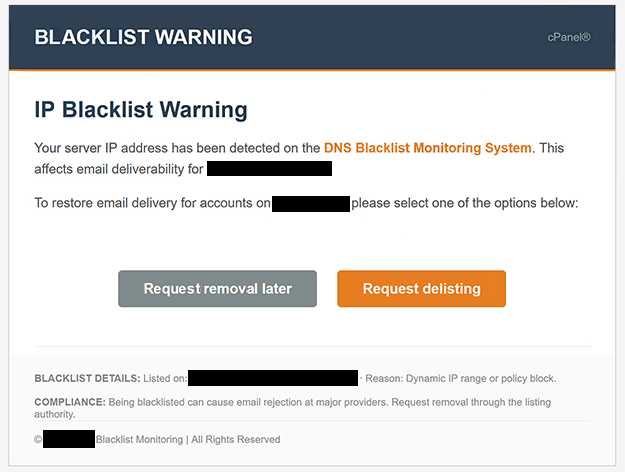
The phishing email informs recipients that suspicious activity, spam-related behavior, or server reputation issues have allegedly caused their IP address to be blacklisted. According to the message, immediate action is required to prevent disruptions to email services and maintain account functionality. By presenting the situation as a technical issue that could impact communication services, the scammers attempt to create a sense of urgency.
To supposedly resolve the problem, the “IP Blacklist Warning” email instructs recipients to click a button or hyperlink and complete a verification procedure. Instead of directing users to a legitimate cPanel or hosting provider portal, the link opens a phishing website designed to imitate a webmail login page. The counterfeit portal requests email account credentials under the pretense of verifying account ownership and restoring normal service.
Once victims enter their login information, the credentials are transmitted directly to the attackers behind the campaign. Cybercriminals can then access the compromised mailbox and potentially use it to steal information, impersonate the account owner, distribute spam, or launch additional phishing attacks. Email accounts are particularly valuable targets because they often contain sensitive communications and provide access to password recovery functions for other online services.
The “IP Blacklist Warning” scam exploits concerns about email deliverability and server reputation. Many website owners, businesses, and hosting customers understand that blacklisted IP addresses can create communication problems. Attackers take advantage of this knowledge by presenting a fake technical issue that appears plausible to recipients who manage websites or email services.
Another reason the scam can appear convincing is its use of technical language. The email may reference blacklist databases, server reputation monitoring, spam detection systems, or email security measures. These references are intended to make the notification appear as though it originated from a legitimate hosting provider or system administrator.
Unlike phishing campaigns that focus on password expiration or mailbox suspension, the “IP Blacklist Warning” scam centers on a supposed infrastructure problem. This approach can be effective because recipients may not immediately recognize blacklist-related warnings as a common phishing tactic.
The email often uses professional formatting and hosting-related terminology to reinforce credibility. Logos, account references, and support-style messaging may be included to make the notification resemble a genuine technical alert. However, the underlying goal remains the same: directing users to a phishing page where credentials can be stolen.
Anyone who entered credentials into a website linked to the “IP Blacklist Warning” scam should immediately change their password and review the affected account for suspicious activity. If the same password was used on other services, those accounts should also be secured to prevent further compromise.
The full “IP Blacklist Warning” phishing email is below:
Subject: – Server IP Has Been Blacklisted: Please Confirm To Continue.
BLACKLIST WARNING cPanel®
IP Blacklist Warning
Your server IP address has been detected on the DNS Blacklist Monitoring System. This affects email deliverability for -.
To restore email delivery for accounts on -, please select one of the options below:
[Request removal later] [Request delisting]
BLACKLIST DETAILS: Listed on: – · Reason: Dynamic IP range or policy block.
COMPLIANCE: Being blacklisted can cause email rejection at major providers. Request removal through the listing authority.
© – Blacklist Monitoring | All Rights Reserved
How to recognize phishing emails
Phishing campaigns such as the “IP Blacklist Warning” scam often imitate technical support notifications and account security alerts in order to gain the trust of recipients. Recognizing the warning signs associated with these messages can help prevent credential theft.
One common indicator is an unexpected technical warning requiring immediate action. Legitimate service providers generally offer account notifications through official management portals and support systems rather than demanding urgent credential verification through unsolicited emails.
The sender’s address should always be examined carefully. Fraudulent emails frequently impersonate hosting companies, cPanel administrators, or support departments while using unrelated domains or suspicious email addresses. Even when the sender name appears professional, the actual address may reveal that the email did not originate from the claimed organization.
Links embedded inside phishing emails are another major warning sign. In scams like “IP Blacklist Warning”, the provided link leads to a counterfeit login page rather than an official hosting or cPanel portal. Hovering over links before clicking can often reveal suspicious website addresses that do not belong to the legitimate service provider.
Another indicator is the use of pressure tactics. The email may warn that services will be disrupted, email delivery will fail, or domain reputation will be damaged unless action is taken immediately. Cybercriminals use these warnings to encourage impulsive decisions rather than careful verification.
Users should also be cautious of emails requesting passwords through verification pages. Legitimate hosting providers generally do not require customers to confirm credentials through external links received in unsolicited messages. Any unexpected login request should be treated with suspicion.
Generic wording can provide another clue. Many phishing campaigns are distributed to large numbers of recipients and therefore avoid highly personalized account information. Broad references to security issues, blacklist status, or account verification are often signs of mass-distributed phishing emails.
The safest response to suspicious technical notifications is to avoid interacting with the email directly. Instead of clicking embedded links, users should manually access their hosting provider’s official website and review account notifications there. If no corresponding warning appears within the account, the email is likely fraudulent.
Incoming search terms:
Site Disclaimer
2-remove-virus.com is not sponsored, owned, affiliated, or linked to malware developers or distributors that are referenced in this article. The article does not promote or endorse any type of malware. We aim at providing useful information that will help computer users to detect and eliminate the unwanted malicious programs from their computers. This can be done manually by following the instructions presented in the article or automatically by implementing the suggested anti-malware tools.
The article is only meant to be used for educational purposes. If you follow the instructions given in the article, you agree to be contracted by the disclaimer. We do not guarantee that the artcile will present you with a solution that removes the malign threats completely. Malware changes constantly, which is why, in some cases, it may be difficult to clean the computer fully by using only the manual removal instructions.