

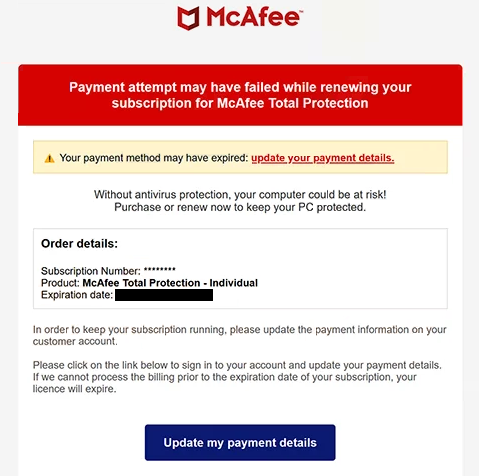
The “McAfee – Payment Method May Have Failed” phishing email tries to convince recipients that a payment for their antivirus subscription has failed. It claims that the payment method connected to a McAfee Total Protection subscription may have expired and needs to be updated before the subscription ends. The email is not a genuine billing notice from McAfee.
It uses the subject “Don’t lose coverage: Exclusive renewal savings on your Norton Antivirus,” which immediately creates an inconsistency. While the subject refers to Norton Antivirus, the rest of the email uses McAfee branding and discusses a McAfee Total Protection subscription. Norton and McAfee are separate companies, so there is no legitimate reason for both brands to appear in the same billing email.
The email says that an attempt to renew McAfee Total Protection may have failed because the recipient’s payment method has expired. It then warns that the computer could be left without antivirus protection unless the subscription is renewed.
To make the supposed renewal problem look more convincing, the email includes order information. It lists a subscription number, identifies the product as “McAfee Total Protection – Individual,” and gives August 27, 2026 as the expiration date.
Recipients are told to update the payment information in their customer account before the subscription expires. The email provides an “Update my payment details” option and warns that the license will expire if billing cannot be processed in time.
The website connected to the email was no longer available when the scam was examined, so exactly what recipients would have seen after following the instructions could not be confirmed. There are two possible explanations based on the available information. The site may have been a fake McAfee page created to collect payment and personal information, or the email may have used a deceptive affiliate link that eventually took visitors to a genuine McAfee purchase page so the sender could earn a commission.
This distinction matters because it cannot be confirmed that the email was definitely collecting credit card details. If the original site was a phishing page, information entered there could have been sent to scammers. If it was an affiliate scheme, the deception instead involved misleading recipients into making a purchase they had not knowingly sought out.
McAfee has no involvement in the email. Its name, product information, and security warnings are being used without authorization.
The full “McAfee – Payment Method May Have Failed” phishing email is below:
Subject: Don’t lose coverage: Exclusive renewal savings on your Norton Antivirus
McAfee
Payment attempt may have failed while renewing your subscription for McAfee Total Protection
Your payment method may have expired: update your payment details.
Without antivirus protection, your computer could be at risk!
Purchase or renew now to keep your PC protected.Order details:
Subscription Number: ********
Product: McAfee Total Protection – Individual
Expiration date: –In order to keep your subscription running, please update the payment information on your customer account.
Please click on the link below to sign in to your account and update your payment details. If we cannot process the billing prior to the expiration date of your subscription, your licence will expire.
[Update my payment details]You may unsubscribe at any time by clicking here.
How to recognize the “McAfee – Payment Method May Have Failed” phishing email
The mix of McAfee and Norton branding is the clearest problem with this email. The subject promotes renewal savings for “Norton Antivirus,” while the email itself claims that a McAfee Total Protection payment has failed. A genuine subscription notice would not confuse two competing antivirus companies in this way.
The warning about losing antivirus protection is also meant to make the situation feel more urgent. Recipients are told that their computer could be at risk and that they need to purchase or renew protection. Combined with the supposed expiration date, this gives them a reason to act quickly instead of checking whether they actually have the subscription mentioned in the email.
Anyone receiving this type of billing notice should first check whether they use the product at all. If there is an active McAfee subscription, its billing status can be checked by opening the official McAfee service independently and signing in to the account. There is no need to use anything provided in an unexpected email.
The sender information should also be checked carefully. In this case, the sender is identified as “Norton Protection Services,” despite the email being presented as a McAfee renewal notice. That contradiction alone is enough to question the legitimacy of the email.
Recipients should be especially cautious about entering card details, personal information, or account credentials after following unexpected renewal instructions. Even a professional-looking page can be copied or used as part of a misleading sales scheme.
Simply receiving or reading the “McAfee – Payment Method May Have Failed” phishing email does not mean that a payment has been made or that the computer has been infected. Users who have not provided any information can delete the email.
Site Disclaimer
2-remove-virus.com is not sponsored, owned, affiliated, or linked to malware developers or distributors that are referenced in this article. The article does not promote or endorse any type of malware. We aim at providing useful information that will help computer users to detect and eliminate the unwanted malicious programs from their computers. This can be done manually by following the instructions presented in the article or automatically by implementing the suggested anti-malware tools.
The article is only meant to be used for educational purposes. If you follow the instructions given in the article, you agree to be contracted by the disclaimer. We do not guarantee that the artcile will present you with a solution that removes the malign threats completely. Malware changes constantly, which is why, in some cases, it may be difficult to clean the computer fully by using only the manual removal instructions.