

The “Messages Delayed Due To A Server Error” email is a phishing attempt designed to steal email account credentials. It poses as an automated notification from the recipient’s email administrator and claims that incoming messages have been delayed because of a server error. The reported problem is not genuine and is used to direct recipients to a phishing website.
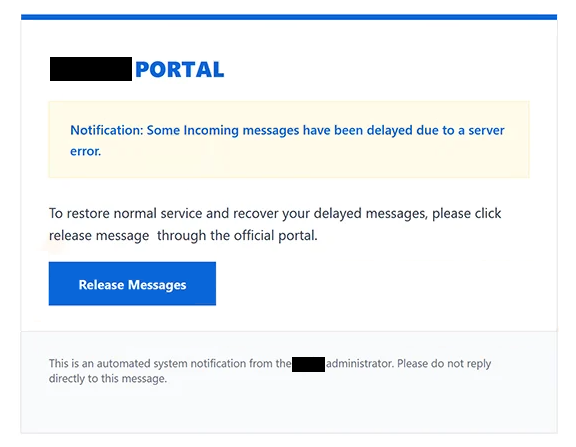
The email has been observed with the subject line “Pending Message Delivery(-).” It claims that some incoming emails have encountered a server problem and cannot be delivered normally. Recipients are led to believe that these messages must be manually released before they can reach the inbox.
To supposedly resolve the issue, the email provides a “Release Messages” button. Selecting it does not release any emails. Instead, recipients are taken to logon.confirmation.vu, a phishing website designed to imitate the Zoho Mail login interface.
The fake page can display the recipient’s email address in the username field. This does not mean that the website recognizes or manages the account. The address can be passed to the phishing page through the link contained in the email. Visitors are then asked to provide the password associated with the displayed address.
Credentials entered into the form are captured by the scammers. Providing a password does not release delayed messages or correct a server error. Zoho Corporation has no connection to this phishing campaign; its login interface is imitated to make the page appear legitimate.
Valid stolen credentials may allow scammers to access the victim’s mailbox, exposing emails and other information available through the account. A compromised mailbox could also be misused to impersonate its owner. Since email accounts are commonly used for password recovery, access may also help scammers target other accounts associated with the same address.
The full “Messages Delayed Due To A Server Error” phishing email is below:
Subject: Pending Message Delivery(-)
– PORTAL
Notification: Some Incoming messages have been delayed due to a server error.
To restore normal service and recover your delayed messages, please click release message through the official portal.
[Release Messages]This is an automated system notification from the – administrator. Please do not reply directly to this message.
How to recognize the “Messages Delayed Due To A Server Error” phishing email
The vague description of the supposed server problem is one reason to question this email. It claims that incoming messages have been delayed but provides little meaningful information about the error or the affected emails. Instead, it focuses on convincing recipients to select “Release Messages.”
Recipients should check their mailbox independently through the email provider’s official website or application rather than using the supplied button. This allows any genuine account or delivery problems to be investigated without visiting a website linked from an unexpected email.
The destination of the button is particularly important. “Release Messages” opens logon.confirmation.vu rather than an official Zoho domain. Although the page copies the appearance of Zoho Mail, visual similarity does not establish that a website belongs to the service it imitates.
The pre-filled email address is another deceptive element. Because the address can be transferred through the phishing link, its appearance on the login page is not evidence that the site is legitimate.
Recipients should also examine the complete sender address rather than trusting the claim that the email came from an administrator. The request to enter an email password on an external website to release supposedly delayed messages should also be treated as a major warning sign.
Users who received the email but did not submit credentials have not disclosed their password through this scam and should delete the message without using the button.
If a password was entered on the fake Zoho Mail page, it should be changed through the legitimate email provider. The same password should also be replaced on other accounts where it was reused, and the mailbox should be checked for unauthorized activity.
Incoming search terms:
Site Disclaimer
2-remove-virus.com is not sponsored, owned, affiliated, or linked to malware developers or distributors that are referenced in this article. The article does not promote or endorse any type of malware. We aim at providing useful information that will help computer users to detect and eliminate the unwanted malicious programs from their computers. This can be done manually by following the instructions presented in the article or automatically by implementing the suggested anti-malware tools.
The article is only meant to be used for educational purposes. If you follow the instructions given in the article, you agree to be contracted by the disclaimer. We do not guarantee that the artcile will present you with a solution that removes the malign threats completely. Malware changes constantly, which is why, in some cases, it may be difficult to clean the computer fully by using only the manual removal instructions.