

The “Windows key code is not valid and seems pirated” warning is part of a tech-support scam that uses fake Windows security alerts to frighten users into calling scammers. The message appears on a deceptive website designed to resemble a legitimate Microsoft or Windows notification. It is not generated by Windows, and the webpage cannot establish through this warning that the user’s Windows license is pirated or invalid.
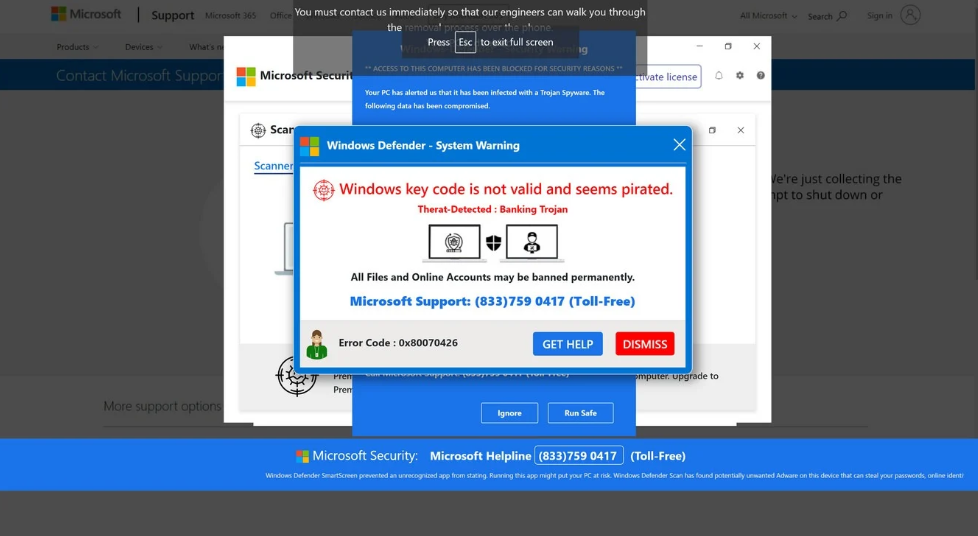
The scam page displays alarming messages claiming that a serious problem has been detected. One of the warnings states that the “Windows key code is not valid and seems pirated,” creating the impression that Windows has identified a licensing problem and restricted access to the computer. Other messages can claim that the PC is infected with Trojan-type spyware or display “Microsoft_Windows_Firewall_Alert!” alongside supposed security warnings.
The page may also make the browser appear locked. It can use persistent pop-ups, full-screen displays, repeated warnings, or other browser-based techniques that interfere with normal navigation. These tactics are intended to convince the victim that Microsoft has restricted the computer because of a Windows licensing or security problem.
Microsoft does not lock computers through browser pages and then require users to call a telephone number displayed in a pop-up to restore access. A website displaying “Windows key code is not valid and seems pirated” should therefore not be interpreted as evidence that Windows has been deactivated or that Microsoft has remotely locked the device.
The primary objective is to convince the victim to call the support number displayed by the scam page. The people answering are scammers rather than legitimate Microsoft technicians. They may reinforce the warnings shown in the browser and claim that the computer has a serious licensing, malware, or security issue that requires immediate attention.
The scammers can then instruct the victim to install remote-access software. Applications such as AnyDesk, TeamViewer, UltraViewer, ConnectWise ScreenConnect, or Zoho Assist can provide another person with remote access to a computer when the user grants the necessary permissions.
Once connected, scammers can view and control the computer while pretending to diagnose the fabricated problem. They may show ordinary Windows information, logs, or system details and falsely describe them as evidence of malware or other serious issues.
Remote access can also allow scammers to interfere with the system or lock the victim out of the computer. They can then demand money to supposedly repair the device, remove nonexistent threats, restore access, or resolve the fabricated Windows licensing problem.
The initial “Windows key code is not valid and seems pirated” pop-up is not Microsoft locking the computer. The more serious risk begins when victims follow the instructions, call the scammers, and provide remote access to their systems.
How does the “Windows key code is not valid and seems pirated” scam appear and how can it be avoided?
Users can encounter this tech-support scam through malicious advertisements, redirects from questionable websites, deceptive browser notifications, fake download buttons, or redirects associated with adware and browser hijackers. Merely encountering the warning does not confirm that malware is installed on the computer.
The demand to call a telephone number is a major indication that the warning should not be trusted. Microsoft does not use browser pop-ups claiming that a Windows computer has been locked, or require users to call a telephone number displayed on the webpage because the Windows key supposedly appears pirated.
Users should not call the displayed number, provide payment information, install applications requested by the supposed technician, or grant remote access to the computer. If the page makes the browser difficult to close, terminating the browser can stop the scripts responsible for displaying the fake warnings.
Repeated appearances of similar pages should be investigated. Unwanted browser notifications, suspicious extensions, browser hijackers, or adware may contribute to persistent redirects and should be removed if identified.
If remote access has already been granted, the computer should be disconnected from the Internet to interrupt an active remote session. Remote-access applications installed at the scammers’ request should be removed, and the device should be checked for unwanted or malicious software.
Passwords that may have been exposed while scammers had access to the computer should be changed using another trusted device. If payment or financial information was disclosed, the relevant financial institution should also be contacted.
The central claim behind the “Windows key code is not valid and seems pirated” scam is fabricated. A browser page cannot legitimately lock Windows on Microsoft’s behalf and demand that the user call a displayed support number. The warning is designed to connect victims with scammers who attempt to obtain remote access, manipulate or lock the computer, and demand money to resolve a problem they created or falsely claimed was present.
Site Disclaimer
2-remove-virus.com is not sponsored, owned, affiliated, or linked to malware developers or distributors that are referenced in this article. The article does not promote or endorse any type of malware. We aim at providing useful information that will help computer users to detect and eliminate the unwanted malicious programs from their computers. This can be done manually by following the instructions presented in the article or automatically by implementing the suggested anti-malware tools.
The article is only meant to be used for educational purposes. If you follow the instructions given in the article, you agree to be contracted by the disclaimer. We do not guarantee that the artcile will present you with a solution that removes the malign threats completely. Malware changes constantly, which is why, in some cases, it may be difficult to clean the computer fully by using only the manual removal instructions.