

The “Microsoft Firewall Alert” pop-up is a tech support scam that uses fake Windows security warnings to frighten visitors into contacting scammers. The page pretends that Microsoft Defender has detected infected files on the computer and creates the impression that immediate technical assistance is required.
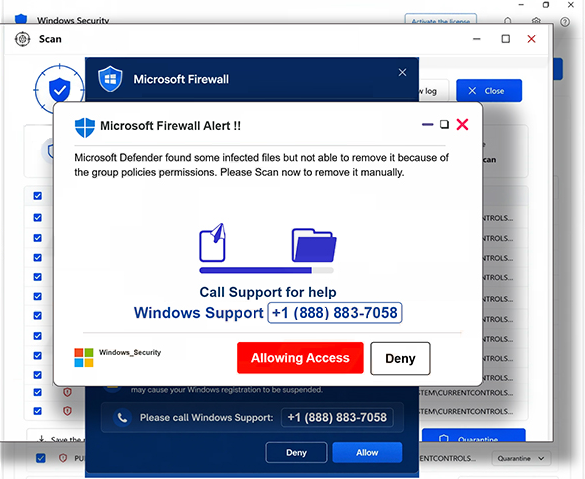
When opened, the scam page displays several overlapping pop-up windows. This cluttered presentation can make the browser difficult to use or close and helps create the impression that a serious system problem has occurred.
One of the prominent warnings is headed “Microsoft Firewall Alert !!”. It claims that Microsoft Defender has discovered infected files but cannot remove them because of group policy restrictions. Visitors are urged to call “Windows Support” using the telephone number displayed on the page.
The warning is entirely fabricated. A website cannot determine that Microsoft Defender has found files that it cannot remove because of group policy settings in the manner described by this page. The telephone number does not connect visitors to legitimate Microsoft support.
Calling the displayed number connects victims with scammers posing as support representatives. They may attempt to convince callers that their computers are infected or otherwise compromised and use the fabricated problem as a reason to gain remote access to the system.
Remote access software such as TeamViewer may be used during this process. If victims grant access, scammers can potentially view information on the computer, obtain saved credentials, access financial accounts, or demand payment for unnecessary repair services. They may also use remote control of the system to introduce malicious software.
Microsoft and Windows are not connected to the “Microsoft Firewall Alert” pop-up. Genuine Windows security notifications do not appear as random browser pages instructing users to call an unknown support number.
Users who encounter the page should not call the displayed number or interact with its buttons. Closing the browser is normally sufficient. If the scam prevents the browser from responding normally, it can be terminated through Task Manager and then reopened.
How users encounter the “Microsoft Firewall Alert” scam
This particular scam is promoted through more than one route. One confirmed method involves deceptive emails designed to send recipients directly to the fake security page.
The email associated with the campaign uses the subject “Activity Sent From Your Own Account”. It claims that unusual activity has been detected and that an email appears to have been sent from the recipient’s own account. This creates a separate security concern before the victim ever sees the fake Microsoft warning.
Recipients who supposedly do not recognize the activity are encouraged to investigate it. The email contains links labeled “Review account activity” and “Review security settings”. Both direct users to the website displaying the “Microsoft Firewall Alert” scam rather than to legitimate account security settings.
Other routes to tech support scam pages can include rogue advertising networks, misleading online advertisements, browser notifications from questionable websites, and adware. Websites offering pirated content, torrents, or similar material can also expose visitors to advertising networks that generate unwanted redirects.
Users can reduce their exposure by avoiding links in unexpected security emails and accessing account settings directly through the relevant service instead. Requests from unfamiliar websites to enable browser notifications should also be declined, particularly when notification permission is presented as a requirement for viewing content or continuing to a page.
Software should be obtained from official sources, and unfamiliar applications should not be installed simply because a website claims they are required to fix a security problem. Unexpected redirects that repeatedly open questionable advertisements or warning pages can also justify checking the browser and system for unwanted software.
The key point with the “Microsoft Firewall Alert” scam is that the alarming browser display is not evidence of a Defender detection. Its purpose is to move the victim from a fake security warning to a phone conversation with scammers. Calling the number or granting remote access creates the actual risk; the browser warning itself does not prove that the computer has the infection it claims to have found.
Incoming search terms:
Site Disclaimer
2-remove-virus.com is not sponsored, owned, affiliated, or linked to malware developers or distributors that are referenced in this article. The article does not promote or endorse any type of malware. We aim at providing useful information that will help computer users to detect and eliminate the unwanted malicious programs from their computers. This can be done manually by following the instructions presented in the article or automatically by implementing the suggested anti-malware tools.
The article is only meant to be used for educational purposes. If you follow the instructions given in the article, you agree to be contracted by the disclaimer. We do not guarantee that the artcile will present you with a solution that removes the malign threats completely. Malware changes constantly, which is why, in some cases, it may be difficult to clean the computer fully by using only the manual removal instructions.