

The “Netflix – Your payment was unsuccessful” phishing email is a scam that impersonates Netflix and attempts to steal account credentials and payment card information. The email creates the impression that there is a problem with the recipient’s Netflix payment and directs them toward a website that imitates the streaming service.
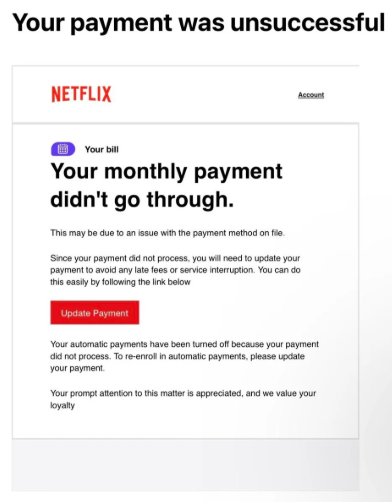
The payment problem provides a plausible reason for asking the recipient to take action. Someone who believes their subscription could be affected may follow the instructions without first checking whether the email actually came from Netflix. The scam then moves from the email to a fake website where sensitive information can be collected.
The website opened from the phishing email was designed to look like Netflix. Its colors, layout, and overall appearance closely resembled the legitimate service. The fake website included a Netflix-style login page. It allowed visitors to enter their email address and password and continued to the next stage after the information was submitted. This makes the fake login more convincing because the page behaves like part of a functioning account process instead of simply collecting information and stopping.
The “Netflix – Your payment was unsuccessful” phishing email is designed to collect multiple types of valuable information. The fake login page can capture Netflix credentials, while the following payment page can obtain card information.
The appearance of the phishing website is an important part of the deception. A page can copy Netflix’s branding without having any connection to Netflix. Logos, colors, login forms, and familiar layouts therefore cannot establish that a website is legitimate.
If login credentials are entered on the phishing site, the password needs to be changed immediately to prevent account takeover. And if payment card information has been entered, it’s necessary to contact the bank to report the card as stolen and prevent unauthorized transactions.
How to recognize phishing emails
The “Netflix – Your payment was unsuccessful” phishing email demonstrates why an unexpected payment warning should be verified before following its instructions. An email claiming that a subscription payment failed can create pressure to respond quickly, but the claim itself does not prove that there is a problem with the account.
Checking the sender’s actual email address is an important first step. A sender name can be made to display “Netflix” even when the underlying email address has no legitimate connection to the company.
Links deserve similar attention. A phishing email can direct recipients to a website that visually resembles the real service while using an unrelated domain. Before entering a password, payment information, or other sensitive data, users should examine the actual domain displayed in the browser rather than relying on the appearance of the page.
The presence of a secure connection does not establish that a website belongs to Netflix. A phishing website can also use HTTPS. A secure connection concerns how information is transmitted between the browser and the website; it does not by itself confirm that the organization represented on the page owns that website.
The safest way to investigate an unexpected Netflix payment warning is to avoid using the link provided in the email. Instead, recipients can open the Netflix application or navigate to Netflix independently and check their account. If there is a genuine billing problem, it can be investigated from within the legitimate account rather than through a page selected by an unsolicited email.
A sequence of convincing pages should not be taken as evidence that a website is genuine either. The phishing site associated with this scam accepted login information and then continued to a payment page. This behavior made the process appear more realistic, but both stages were part of the same phishing attempt.
Requests for card information after following an unexpected email link should therefore be treated cautiously. If a supposed Netflix page asks for payment details, users should first verify its domain and independently access their account before providing anything.
The “Netflix – Your payment was unsuccessful” phishing email ultimately relies on recipients trusting familiar branding and a believable payment problem.
Site Disclaimer
2-remove-virus.com is not sponsored, owned, affiliated, or linked to malware developers or distributors that are referenced in this article. The article does not promote or endorse any type of malware. We aim at providing useful information that will help computer users to detect and eliminate the unwanted malicious programs from their computers. This can be done manually by following the instructions presented in the article or automatically by implementing the suggested anti-malware tools.
The article is only meant to be used for educational purposes. If you follow the instructions given in the article, you agree to be contracted by the disclaimer. We do not guarantee that the artcile will present you with a solution that removes the malign threats completely. Malware changes constantly, which is why, in some cases, it may be difficult to clean the computer fully by using only the manual removal instructions.