

The “Password Update Alert” email is a phishing message designed to steal email account login credentials. It presents itself as an automated security notification from the recipient’s email service provider and claims that the password associated with the account is approaching expiration. The warning is fabricated and is used to pressure recipients into visiting a fraudulent website and submitting their credentials.
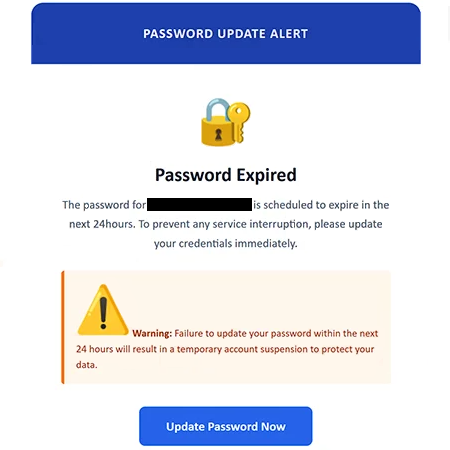
The deceptive email has been observed with the subject line “Urgent Notice: Your E-mail Password Will Expire In 24hours.” Its contents reinforce the same claim by stating that the password connected to the recipient’s email address is scheduled to expire within the next 24 hours. According to the message, the recipient must update their credentials immediately to prevent an interruption to their email service.
To make the situation appear more serious, the email also warns that failing to complete the supposed password update within the stated deadline will result in temporary account suspension. The message claims that this measure is necessary to protect the recipient’s data. It ends by presenting itself as an automated communication from a security support team and tells recipients not to reply.
The primary action offered in the email is a button labeled “Update Password Now.” This button is not a legitimate password-management function provided by the recipient’s email service. Instead, it directs users toward a phishing site. At the time the campaign was examined, the website reached through the email was no longer operational. However, the purpose of the campaign is evident from the message itself: recipients are being encouraged to follow an external destination under the pretext of updating their email password.
A phishing page used for this purpose is intended to obtain the credentials entered by visitors rather than perform a genuine password change. Such a page can imitate an email login interface or otherwise present a sign-in form that appears appropriate for the account being targeted. If a recipient enters an email address and password into the fraudulent form, that information is submitted to the scammers.
This makes the “Password Update Alert” scam particularly significant because an email account can provide access to considerably more information than the messages stored in the inbox. If criminals obtain working email credentials, they can potentially access private correspondence and impersonate the account owner. They may also attempt to use the compromised mailbox to reset passwords for other online services connected to that email address.
Access to an email account can therefore assist criminals in compromising additional accounts where password resets or verification messages are delivered through email. Stolen access may also be exploited to contact people found in the victim’s correspondence while pretending to be the legitimate account owner. Credentials obtained through phishing can additionally be shared or sold to other criminals.
The warning in the “Password Update Alert” email should not be treated as a genuine notice from an email provider. The supposed 24-hour password expiration and threat of temporary suspension are part of the deception. The campaign relies on the recipient believing that immediate action is necessary and interacting with the “Update Password Now” button before independently checking whether the warning is genuine.
The full “Password Update Alert” phishing email is below:
Subject: Urgent Notice: Your E-mail Password Will Expire In 24hours
PASSWORD UPDATE ALERT
Password Expired
The password for – is scheduled to expire in the next 24hours. To prevent any service interruption, please update your credentials immediately.
Warning: Failure to update your password within the next 24 hours will result in a temporary account suspension to protect your data.
[Update Password Now]© 2026 – Security Support Team
This is an automated message, please do not reply.
How to recognize the “Password Update Alert” phishing email
The most important warning sign in this campaign is the combination of an unexpected password-expiration notice, an extremely short deadline, and a threat that the email account will be suspended. The message attempts to turn an ordinary account-security issue into an emergency by claiming that recipients have only 24 hours to act. Creating this sense of urgency can discourage users from examining the message carefully or verifying the alleged problem through their email provider.
Recipients should also pay close attention to where a password-update button actually leads. An email claiming that credentials need to be changed does not require users to trust the destination embedded in the message. Instead of selecting the “Update Password Now” button, users can access their email provider independently by opening its official website or application and checking their account and security settings there.
The sender information should also be examined before trusting an account-related email. The visible name associated with an email is not sufficient evidence that the message originated from the organization it claims to represent. The complete sender address and its domain should correspond to the legitimate provider. Any discrepancy between the claimed sender and the actual sending domain is a strong reason not to interact with the message.
Links and buttons deserve similar scrutiny. On desktop email clients and browsers, hovering over a button or hyperlink can often reveal its destination without opening it. If the address does not belong to the service supposedly sending the notification, recipients should not proceed. Even when a destination initially appears convincing, manually navigating to the provider’s known official site is safer than using an unsolicited password-update button.
The wording of this particular message provides additional reasons for caution. It claims that the recipient’s password will expire within 24 hours and that failure to update it will cause temporary account suspension. These statements are specifically intended to push the recipient toward the supplied button. A genuine account concern can be investigated separately through the provider’s official account interface without following instructions contained in an unexpected email.
Anyone who has received the “Password Update Alert” message but has not clicked its button or supplied credentials should simply avoid interacting with it and delete the email. Merely receiving or reading this phishing message does not provide the scammers with the recipient’s password.
The situation is different if credentials were entered into the fraudulent website. In that case, the password for the affected email account should be changed immediately through the legitimate provider. If the same password has been reused for other accounts, those passwords should also be replaced with unique credentials. The account should also be checked for unauthorized changes or activity, particularly changes that could help an attacker retain access.
Because email addresses frequently serve as recovery or verification channels for other online accounts, users who submitted their credentials should also review important services associated with the compromised mailbox. If access to the inbox has already been obtained by someone else, securing only unrelated accounts while leaving the email password unchanged would not address the source of the exposure.
The “Password Update Alert” campaign ultimately depends on a straightforward deception: it invents an imminent password expiration, threatens account suspension within 24 hours, and presents an “Update Password Now” button that leads away from legitimate account management. The password warning itself is false, and credentials should never be entered into the website reached through this email.
Site Disclaimer
2-remove-virus.com is not sponsored, owned, affiliated, or linked to malware developers or distributors that are referenced in this article. The article does not promote or endorse any type of malware. We aim at providing useful information that will help computer users to detect and eliminate the unwanted malicious programs from their computers. This can be done manually by following the instructions presented in the article or automatically by implementing the suggested anti-malware tools.
The article is only meant to be used for educational purposes. If you follow the instructions given in the article, you agree to be contracted by the disclaimer. We do not guarantee that the artcile will present you with a solution that removes the malign threats completely. Malware changes constantly, which is why, in some cases, it may be difficult to clean the computer fully by using only the manual removal instructions.