

The “Spotify – Invalid Payment Method” phishing email impersonates Spotify and claims there is a problem with the payment method connected to the recipient’s Premium subscription. The warning is fake. Its purpose is to direct recipients to a website created to obtain sensitive account and potentially financial information.
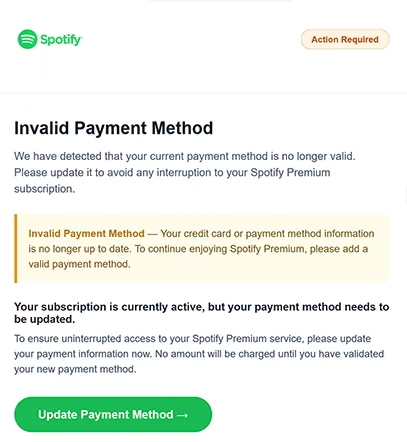
The subject says “Action Required: Update your payment method.” The email then displays “Spotify Action Required” and “Invalid Payment Method,” making the supposed billing problem immediately clear.
According to the email, the payment method currently associated with Spotify Premium is no longer valid. It says that the credit card or other payment information needs to be updated to prevent the subscription from being interrupted.
Recipients are also told that their Premium subscription remains active for the moment. However, the email warns that updated payment information is necessary to continue using the service without interruption. It adds that no money will be charged until the new payment method has been validated.
To supposedly correct the billing issue, the email instructs recipients to select “Update Payment Method.” The website associated with this option was no longer available when examined, so the exact information it requested could not be confirmed.
The site was designed to impersonate Spotify. It may have asked visitors to provide their Spotify credentials and could also have requested credit card or other payment information. Since the page was inactive during analysis, the precise forms and fields it displayed should not be treated as confirmed.
Spotify has no connection to this phishing email. Its branding and the Premium subscription payment scenario are simply used to make the request appear credible, particularly to people who already have a Spotify subscription.
If Spotify credentials are submitted to scammers, they could attempt to take control of the account. Reused passwords could also put other accounts at risk if the same login information has been used elsewhere.
Providing payment information would create additional financial risks. Stolen card details could potentially be used for unauthorized transactions or other forms of financial fraud.
The full “Spotify – Invalid Payment Method” phishing email is below:
Subject: Action Required: Update your payment method.
Spotify Action Required
Invalid Payment MethodWe have detected that your current payment method is no longer valid. Please update it to avoid any interruption to your Spotify Premium subscription.
Invalid Payment Method — Your credit card or payment method information is no longer up to date. To continue enjoying Spotify Premium, please add a valid payment method.
Your subscription is currently active, but your payment method needs to be updated.
To ensure uninterrupted access to your Spotify Premium service, please update your payment information now. No amount will be charged until you have validated your new payment method.
[Update Payment Method]
If you have any questions, please visit our Help Center.
The Spotify Team
© 2026 Spotify. All rights reserved.
How to recognize the “Spotify – Invalid Payment Method” phishing email
A billing warning involving a subscription can seem believable because payment methods genuinely expire or stop working. However, an unexpected email should not be treated as proof that there is actually a problem with a Spotify subscription.
The “Spotify – Invalid Payment Method” phishing email specifically creates urgency by saying that the recipient needs to update their payment information to avoid interruption to Spotify Premium. At the same time, it reassures them that the subscription is currently active and that no charge will occur until a new payment method has been validated.
Rather than using “Update Payment Method,” recipients can check the status of their subscription by opening Spotify independently and signing in normally. Any genuine billing issue should be visible within the account without having to enter sensitive information through a website reached from an unexpected email.
The address of any website requesting Spotify credentials or payment details should also be checked carefully. A page can reproduce Spotify logos, fonts, layouts, and other visual elements without belonging to the company. A familiar appearance alone does not make a login or billing page legitimate.
Requests for both account credentials and payment information deserve particular caution. If a website reached through an unexpected billing email asks for a Spotify password, card number, security code, or other sensitive details, users should leave the page and verify their subscription directly through Spotify.
Receiving or reading the “Spotify – Invalid Payment Method” phishing email does not compromise an account. The danger comes from submitting information after following its instructions.
Anyone who has already entered Spotify credentials on the suspicious website should change their Spotify password through the legitimate service and review the account for unauthorized changes. If the same password is used for other accounts, it should be changed there as well.
If credit card information was provided, the card issuer or bank should be contacted promptly. Transactions should be checked for anything unfamiliar, and the financial institution can advise whether the card needs to be blocked or replaced.
Site Disclaimer
2-remove-virus.com is not sponsored, owned, affiliated, or linked to malware developers or distributors that are referenced in this article. The article does not promote or endorse any type of malware. We aim at providing useful information that will help computer users to detect and eliminate the unwanted malicious programs from their computers. This can be done manually by following the instructions presented in the article or automatically by implementing the suggested anti-malware tools.
The article is only meant to be used for educational purposes. If you follow the instructions given in the article, you agree to be contracted by the disclaimer. We do not guarantee that the artcile will present you with a solution that removes the malign threats completely. Malware changes constantly, which is why, in some cases, it may be difficult to clean the computer fully by using only the manual removal instructions.