

The “Webmail – Final Warning 2FA Authentication required” phishing email claims that the recipient must urgently enable or confirm two-factor authentication to prevent their email account from being restricted or disabled. It presents the situation as a final notice, suggesting that no further warnings will be given. This urgency is intended to push the recipient into acting quickly without verifying the message.
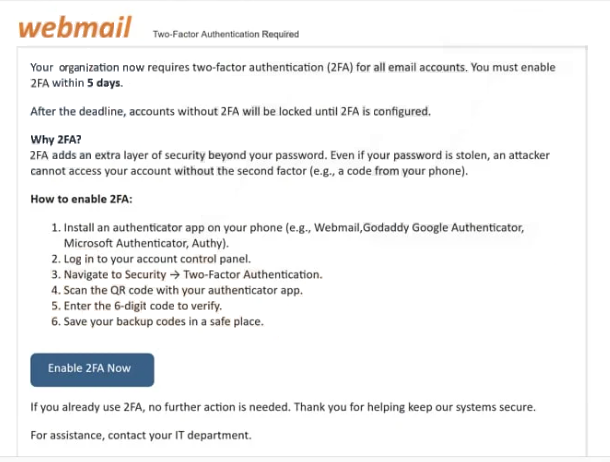
The email does not explain what triggered the warning. It may mention a security policy update or system requirement, but it does not include any verifiable details such as recent login activity or account changes. Instead, it focuses on directing the recipient to complete the process through a link.
Clicking the link leads to a page that imitates a webmail login or security verification portal. The design may resemble a familiar email service, but it does not provide access to real account features. There are no settings, no security options, and no information about two-factor authentication. The page only asks for login credentials.
Entering those credentials does not enable any security feature. The information is sent directly to the scammers, and the page may then display a confirmation message or redirect to a legitimate login page. This behavior is used to make the process appear complete.
The warning about required 2FA authentication is not real. It is a generic claim designed to create pressure and prompt immediate action. By labeling the email as a “final warning,” the scam increases the likelihood that the recipient will respond without checking its authenticity.
If attackers obtain valid login details, they can attempt to access the email account. This may expose messages, attachments, and contact lists. Because email accounts are often linked to other services, access can also be used to reset passwords and compromise additional accounts.
The full “Webmail – Final Warning 2FA Authentication required” phishing email is below:
Subject: Final Warning: 2FA Authentication Required for –
webmail Two-Factor Authentication Required –
Your organization now requires two-factor authentication (2FA) for all email accounts. You must enable 2FA within 5 days.
After the deadline, accounts without 2FA will be locked until 2FA is configured.
Why 2FA?
2FA adds an extra layer of security beyond your password. Even if your password is stolen, an attacker cannot access your account without the second factor (e.g., a code from your phone).How to enable 2FA:
Install an authenticator app on your phone (e.g., Webmail,Godaddy Google Authenticator, Microsoft Authenticator, Authy).
Log in to your account control panel.
Navigate to Security → Two-Factor Authentication.
Scan the QR code with your authenticator app.
Enter the 6‑digit code to verify.
Save your backup codes in a safe place.Enable 2FA Now
If you already use 2FA, no further action is needed. Thank you for helping keep our systems secure.
For assistance, contact your IT department.
This notification was generated automatically on {now}. Please do not respond.
Security settings: Manage 2FA
This is an automated notification. Replies are not monitored.
Copyright © 2026 cPanel, L.L.C. All rights reserved. –
How to recognize phishing emails like “Webmail – Final Warning 2FA Authentication required”
Phishing emails that use urgent security warnings often rely on vague explanations. They claim that action is required, but do not provide specific information that can be verified. Legitimate security notifications usually include details such as login attempts, device information, or timestamps.
Another key indicator is the use of a direct link for verification. Instead of directing users to access their account through the official website, the email includes a link to a login page hosted on a different domain. This page may look similar to a real service, but it is not connected to it.
The sender address is also important to check. While the display name may suggest a support or security team, the actual email address often comes from an unrelated domain. This mismatch is a strong sign that the email is not genuine.
The email is typically written in a general format. It may not include the recipient’s name or any account-specific information. This allows it to be sent to many users without modification.
The wording is designed to create urgency. By stating that this is a final warning and that action must be taken immediately, the email encourages quick responses without careful review.
Recognizing these patterns helps identify phishing emails before interacting with them. Emails that combine urgent warnings, external login links, and inconsistent sender details should be treated with caution.
Site Disclaimer
2-remove-virus.com is not sponsored, owned, affiliated, or linked to malware developers or distributors that are referenced in this article. The article does not promote or endorse any type of malware. We aim at providing useful information that will help computer users to detect and eliminate the unwanted malicious programs from their computers. This can be done manually by following the instructions presented in the article or automatically by implementing the suggested anti-malware tools.
The article is only meant to be used for educational purposes. If you follow the instructions given in the article, you agree to be contracted by the disclaimer. We do not guarantee that the artcile will present you with a solution that removes the malign threats completely. Malware changes constantly, which is why, in some cases, it may be difficult to clean the computer fully by using only the manual removal instructions.