

The “Webmail – Re-validate SSL/TLS” phishing email is a fraudulent message that attempts to steal email account credentials by impersonating a webmail administration or hosting service. It falsely claims that the recipient must revalidate the SSL/TLS security settings associated with their mailbox to prevent disruptions to email services. The message is not sent by a legitimate email provider and is instead part of a phishing campaign designed to harvest login credentials.
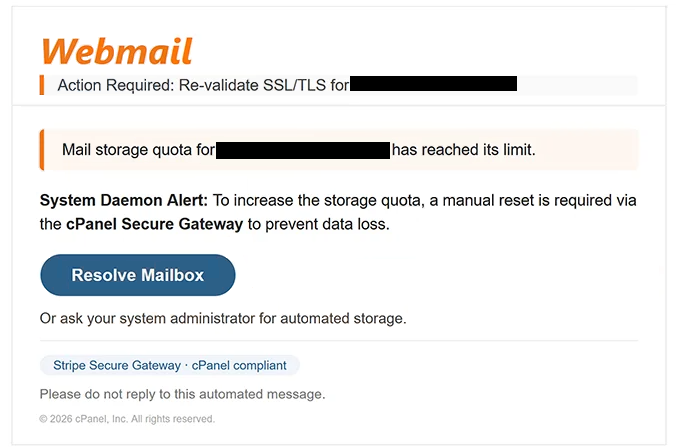
The email typically informs recipients that the SSL/TLS certificate protecting their mailbox requires immediate revalidation due to a recent security update, server migration, or certificate renewal. It warns that failure to complete the verification process may result in encrypted email connections being disabled, outgoing and incoming messages failing, or temporary loss of access to the mailbox. These claims are fabricated to create urgency and persuade recipients to act without questioning the authenticity of the notification.
To complete the supposed validation process, the email contains a button or hyperlink labelled with phrases such as “Re-validate SSL/TLS”, “Validate Now”, or “Update Security Settings”. Rather than directing users to the official webmail portal or hosting provider, the embedded link leads to a counterfeit login page controlled by the attackers.
The phishing website is designed to resemble a legitimate webmail sign-in page, often displaying familiar branding and professional-looking layouts. Visitors are instructed to enter their email address and password to complete the SSL/TLS validation. However, no security certificate is checked or updated. Instead, the submitted credentials are captured and transmitted directly to the cybercriminals operating the phishing campaign.
Compromised email accounts can expose a considerable amount of sensitive information. Attackers who gain access may read confidential correspondence, intercept password reset emails, obtain authentication codes, access invoices and financial documents, and potentially compromise additional online accounts linked to the same email address.
The “Webmail – Re-validate SSL/TLS” phishing email takes advantage of the fact that many users are unfamiliar with SSL/TLS certificates and how they are managed. Recipients may assume that certificate maintenance requires user intervention and therefore follow the instructions without realising that legitimate email providers generally manage SSL/TLS certificates automatically on the server side.
Some versions of the phishing email may include fabricated certificate expiration dates, references to updated encryption standards, or warnings that the mailbox no longer meets current security requirements. Others may claim that the validation must be completed within a limited timeframe to avoid interruptions. These statements are intended solely to increase the credibility of the scam.
Anyone who entered login credentials after following a link contained in the “Webmail – Re-validate SSL/TLS” phishing email should immediately change the password for the affected mailbox. If the same password has been reused elsewhere, those accounts should also be secured. Users should additionally review recent login activity, verify account recovery information, and enable legitimate multi-factor authentication through the official account settings whenever possible.
The full “Webmail – Re-validate SSL/TLS” phishing email is below:
Subject: EMAIL SIZE ALERT: Upgrade Your Mailbox [ – ]
Webmail
Action Required: Re-validate SSL/TLS for –
Mail storage quota for – has reached its limit.System Daemon Alert: To increase the storage quota, a manual reset is required via the cPanel Secure Gateway to prevent data loss.
[Resolve Mailbox]Or ask your system administrator for automated storage.
Stripe Secure Gateway · cPanel compliantPlease do not reply to this automated message.
© 2026 cPanel, Inc. All rights reserved.
How to recognise phishing emails
Unexpected emails requesting SSL/TLS validation should always be approached with caution. Legitimate hosting companies and email providers rarely ask users to revalidate server certificates through links contained in unsolicited emails. In most cases, SSL/TLS certificates are managed automatically by the service provider without requiring any action from end users.
Recipients should carefully inspect the sender’s email address instead of relying solely on the displayed company name. Phishing emails frequently imitate hosting providers or webmail administrators while using unrelated domains that reveal the message is fraudulent.
Another warning sign is a request to sign in through a link included in the email to complete a technical security procedure. Genuine providers typically advise customers to access their accounts by visiting the official website directly rather than authenticating through links received in unexpected messages.
Before entering any credentials, users should verify that the website displayed in the browser’s address bar belongs to their legitimate email provider or hosting company. Even a convincing login page should not be trusted if it is hosted on an unfamiliar or unrelated domain.
The safest response to unexpected SSL/TLS verification emails is to ignore the embedded links and manually open the official website of the email provider or hosting service. If no corresponding notification appears after signing in, the email should be treated as a phishing attempt and deleted.
Incoming search terms:
Site Disclaimer
2-remove-virus.com is not sponsored, owned, affiliated, or linked to malware developers or distributors that are referenced in this article. The article does not promote or endorse any type of malware. We aim at providing useful information that will help computer users to detect and eliminate the unwanted malicious programs from their computers. This can be done manually by following the instructions presented in the article or automatically by implementing the suggested anti-malware tools.
The article is only meant to be used for educational purposes. If you follow the instructions given in the article, you agree to be contracted by the disclaimer. We do not guarantee that the artcile will present you with a solution that removes the malign threats completely. Malware changes constantly, which is why, in some cases, it may be difficult to clean the computer fully by using only the manual removal instructions.