

The “Webmail – You need to Update your Email/Password” phishing email is a fraudulent message that attempts to steal webmail login credentials by impersonating an email administrator or hosting provider. It falsely informs recipients that their mailbox requires an immediate email account or password update to continue operating normally. Rather than helping users secure their accounts, the email directs them to a phishing website designed to collect sensitive information.
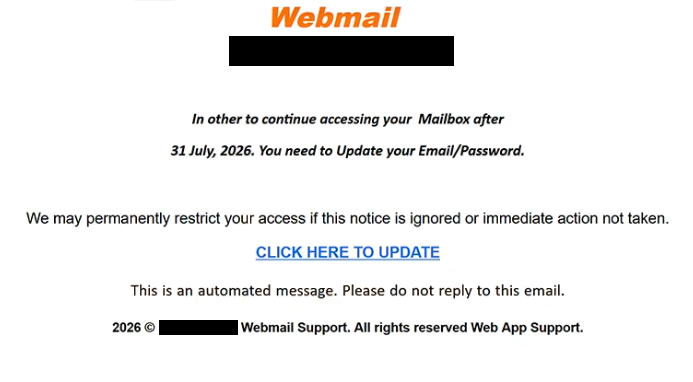
The message typically claims that the recipient’s mailbox has reached a stage where account information must be refreshed due to a recent system upgrade, security enhancement, or server maintenance. It warns that failing to complete the requested update may result in restricted mailbox access, interrupted email delivery, or temporary account suspension. These warnings are fabricated and are intended to pressure recipients into acting without verifying the legitimacy of the notification.
To complete the supposed update, the email includes a button or hyperlink labelled with phrases such as “Update Email/Password”, “Continue”, “Confirm Account”, or “Validate Mailbox”. Instead of directing users to their legitimate webmail service or hosting provider, the link opens a counterfeit login page that closely resembles a genuine webmail interface.
The phishing page asks visitors to enter their email address and password before the update can allegedly be completed. Some versions also request additional information, such as a new password or recovery details. None of the submitted information is used to update the mailbox. Instead, every credential entered into the form is transmitted directly to the cybercriminals operating the phishing campaign.
A compromised webmail account can expose a large amount of valuable information. Attackers may gain access to business correspondence, customer communications, invoices, financial records, password reset emails, authentication codes, contracts, and other confidential documents. Since email accounts are commonly used to recover access to online services, stolen credentials may also allow cybercriminals to compromise additional accounts associated with the victim.
Unlike phishing campaigns that rely on fake malware alerts or unusual login notifications, the “Webmail – You need to Update your Email/Password” phishing email disguises itself as a routine administrative request. Because users occasionally receive legitimate notifications about password changes or account maintenance, the attackers attempt to exploit this familiarity to make the scam appear credible.
To strengthen the illusion of authenticity, the email often includes webmail branding, technical terminology, references to mailbox maintenance, or fabricated support messages. Some versions impose an artificial deadline, claiming that the requested update must be completed within a limited time to prevent service disruption. These tactics are intended solely to create urgency and encourage recipients to click the embedded link.
Anyone who entered login credentials after interacting with the “Webmail – You need to Update your Email/Password” phishing email should immediately change the password for the affected mailbox using the official webmail portal. If the same password has been used on other services, it should also be changed there. Users should additionally review recent login activity, verify account recovery settings, and enable multi-factor authentication if it is supported by their email provider.
The full “Webmail – You need to Update your Email/Password” phishing email is below:
Subject: [-]: Please Confirm To Continue.
Webmail
In other to continue accessing your Mailbox after
31 July, 2026. You need to Update your Email/Password.We may permanently restrict your access if this notice is ignored or immediate action not taken.
[CLICK HERE TO UPDATE]
This is an automated message. Please do not reply to this email.
2026 © – Webmail Support. All rights reserved Web App Support.
How to identify fake webmail password update emails
Unexpected emails requesting an account or password update should always be verified independently before any action is taken. Legitimate email providers generally allow users to manage account settings after signing in through their official website rather than asking them to authenticate through links embedded in unsolicited emails.
Recipients should carefully examine the sender’s email address instead of relying solely on the displayed sender name. Phishing campaigns frequently impersonate webmail administrators or hosting providers while using domains unrelated to the organisation they claim to represent.
Another warning sign is a message demanding immediate action while providing only vague explanations about the supposed update. Genuine service providers typically identify the specific reason for an account change and rarely threaten immediate service interruption through unsolicited emails.
Before entering credentials, users should verify the destination website carefully. If the login page is hosted on an unfamiliar domain or differs from the official webmail address, no information should be entered.
The safest approach is to ignore links contained in unexpected password update notifications and manually access the webmail account by typing the provider’s official address into a browser. If no update request appears after signing in, the email should be regarded as a phishing attempt and deleted.
Incoming search terms:
Site Disclaimer
2-remove-virus.com is not sponsored, owned, affiliated, or linked to malware developers or distributors that are referenced in this article. The article does not promote or endorse any type of malware. We aim at providing useful information that will help computer users to detect and eliminate the unwanted malicious programs from their computers. This can be done manually by following the instructions presented in the article or automatically by implementing the suggested anti-malware tools.
The article is only meant to be used for educational purposes. If you follow the instructions given in the article, you agree to be contracted by the disclaimer. We do not guarantee that the artcile will present you with a solution that removes the malign threats completely. Malware changes constantly, which is why, in some cases, it may be difficult to clean the computer fully by using only the manual removal instructions.