

The “Your Password Is About To Expire” phishing email is a scam created to steal email account passwords. It claims that the recipient’s current password will expire soon and suggests that action is needed to continue using the account without interruption.
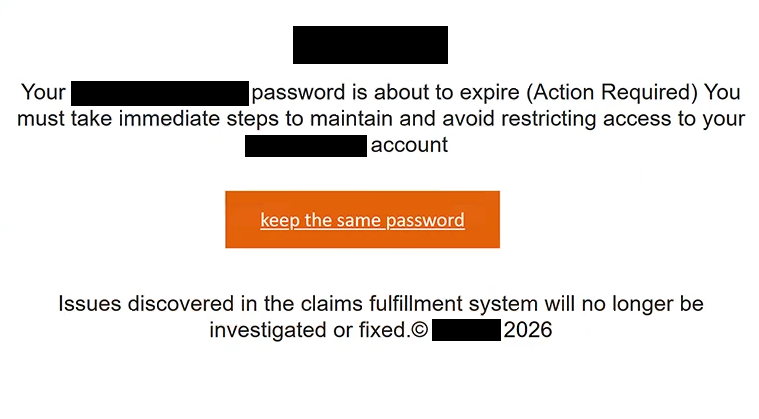
The subject warns that the account “needs urgent attention.” According to the email, the password linked to the recipient’s address is reaching its expiration date. Recipients are then given a way to supposedly keep their existing password rather than replace it with a new one.
To do this, the email tells them to select “keep the same password.” Following this instruction opens a phishing website instead of a genuine account settings page. The site asks for the recipient’s email login details, which are then collected by the scammers.
The fake login page can be made to resemble the email service used by the recipient. During analysis, one version copied Gmail’s sign-in page. Seeing familiar branding can make the request seem legitimate, especially when someone has just been told that their password needs attention.
Entering a password on this page does not extend its validity or make any changes to the real email account. The information is simply submitted to the people operating the phishing site. Gmail and other email providers whose login pages may be copied have no involvement in the scam.
There is also an odd reference to a “claims fulfillment system” in the email. It says that problems involving this system will no longer be investigated or corrected. The statement does not have any clear connection with email passwords or account security and appears out of place in what is supposed to be a password-expiration notice.
If the scammers receive valid login details, they may be able to access the victim’s mailbox. This could expose private emails and other information available through the account. They may also use the mailbox to impersonate its owner or send phishing emails to contacts.
A compromised email account can create problems beyond the mailbox itself. Many online services allow users to reset passwords through email. Someone with access to the account could therefore try to take control of other services registered with the same address.
Nothing needs to be confirmed through this email to prevent a password from expiring. The warning is simply a way to convince recipients to visit a fake login page and provide their credentials.
The full “Your Password Is About To Expire” phishing email is below:
Subject: – needs urgent attention.
[redacted]
Your [redacted] password is about to expire (Action Required) You must take immediate steps to maintain and avoid restricting access to your [redacted] account
[keep the same password]
Issues discovered in the claims fulfillment system will no longer be investigated or fixed.© [redacted] 2026
How to recognize the “Your Password Is About To Expire” phishing email
The request to “keep the same password” should immediately be treated with caution. If an email provider requires a password change, users can handle it through their normal account settings. They should not need to confirm their existing password through a page opened from an unexpected email.
The login screen that appears after following the instructions can look very similar to a real email service. Logos, sign-in forms, fonts, and other familiar elements can easily be copied. A page looking like Gmail or another provider does not mean that it actually belongs to that company.
The unrelated reference to a “claims fulfillment system” is another detail that makes the email suspicious. It does not explain why a password would expire and has little to do with managing an email account.
Recipients should also be careful when an email creates urgency around account access. In this case, the possibility of the password expiring is used to make people deal with the supposed problem quickly. Checking the account independently removes that pressure and makes it easier to determine whether any action is actually required.
Anyone concerned about their password should open their email provider normally rather than following the instructions in the email. After signing in through the genuine service, they can check security settings and change the password if necessary.
Simply receiving or opening the “Your Password Is About To Expire” phishing email does not compromise an account. The risk comes from providing login details on the phishing page.
Site Disclaimer
2-remove-virus.com is not sponsored, owned, affiliated, or linked to malware developers or distributors that are referenced in this article. The article does not promote or endorse any type of malware. We aim at providing useful information that will help computer users to detect and eliminate the unwanted malicious programs from their computers. This can be done manually by following the instructions presented in the article or automatically by implementing the suggested anti-malware tools.
The article is only meant to be used for educational purposes. If you follow the instructions given in the article, you agree to be contracted by the disclaimer. We do not guarantee that the artcile will present you with a solution that removes the malign threats completely. Malware changes constantly, which is why, in some cases, it may be difficult to clean the computer fully by using only the manual removal instructions.