

The “Server Password Expired” email is a phishing attempt designed to steal email account login credentials. It is disguised as a notification from the recipient’s own email server and falsely claims that the password associated with the account will expire that same day. The warning is intended to create urgency and persuade the recipient to enter their credentials on a fake webmail login page.
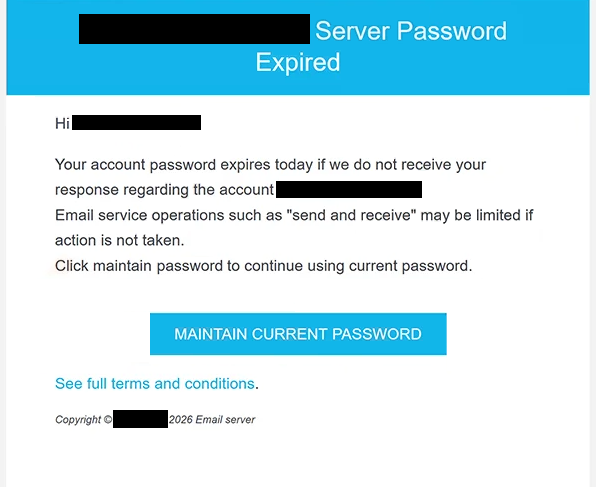
The email has been observed with the subject line “[-]: MAINTAIN CURRENT PASSWORD.” It addresses the recipient and states that the account password will expire unless a response concerning the specified email account is received. It further warns that email functions, including sending and receiving messages, may become limited if the recipient fails to act.
Rather than asking users to create a new password, the email claims that they can continue using their existing one. A button labeled “MAINTAIN CURRENT PASSWORD” is provided for this purpose. The email also contains a link to supposedly view the full terms and conditions and presents itself as a 2026 email server notification.
Selecting “MAINTAIN CURRENT PASSWORD” does not preserve the current password or open a legitimate account-management service. Instead, it directs the recipient to site-bb1800ad6bf6.mypreview.site, where a phishing page imitates a cPanel webmail interface.
The fake page presents webmail options associated with Horde, Roundcube, and SquirrelMail and asks visitors to enter their email address and password. Credentials submitted through this page are captured by the scammers. cPanel has no connection to the campaign.
Obtaining valid credentials can allow scammers to access the victim’s mailbox, read private correspondence, and impersonate the account owner. Access to email can also be used to request password resets for other services associated with the compromised address. Stolen accounts may additionally be used to send further phishing emails.
The password-expiration warning is therefore not a genuine server notification. Its purpose is to make recipients believe that maintaining normal email functionality requires immediate authentication through the supplied page.
The full “Server Password Expired” phishing email is below:
Subject: [-]: MAINTAIN CURRENT PASSWORD.
– Server Password Expired
Hi -,
Your account password expires today if we do not receive your response regarding the account -,
Email service operations such as “send and receive” may be limited if action is not taken.
Click maintain password to continue using current password.
[MAINTAIN CURRENT PASSWORD][See full terms and conditions.]
Copyright © – 2026 Email server
How to recognize the “Server Password Expired” phishing email
The claim that the password expires on the same day is a central warning sign in this campaign. It creates a very short deadline and combines it with the threat that sending and receiving email could become restricted. This pressure is intended to encourage immediate interaction with the “MAINTAIN CURRENT PASSWORD” button.
Recipients should verify password or account notifications independently rather than through the destination supplied in an unexpected email. If there is concern that an email password genuinely requires attention, the account should be accessed through the normal webmail address or the provider’s official account-management interface.
The destination behind the button is particularly revealing. In this campaign, recipients are sent to site-bb1800ad6bf6.mypreview.site rather than their actual email provider. The resulting page may resemble a familiar cPanel webmail interface, but copied branding and recognizable webmail options do not make the website legitimate.
Users should also inspect the complete sender address and the destination of buttons before entering credentials. An email that refers to the recipient’s address or presents itself as an automated server notification does not prove that it originated from the organization managing the mailbox.
Receiving or opening the “Server Password Expired” email does not disclose the recipient’s credentials. Users who have not entered information on the phishing page should avoid the supplied button and delete the email.
Site Disclaimer
2-remove-virus.com is not sponsored, owned, affiliated, or linked to malware developers or distributors that are referenced in this article. The article does not promote or endorse any type of malware. We aim at providing useful information that will help computer users to detect and eliminate the unwanted malicious programs from their computers. This can be done manually by following the instructions presented in the article or automatically by implementing the suggested anti-malware tools.
The article is only meant to be used for educational purposes. If you follow the instructions given in the article, you agree to be contracted by the disclaimer. We do not guarantee that the artcile will present you with a solution that removes the malign threats completely. Malware changes constantly, which is why, in some cases, it may be difficult to clean the computer fully by using only the manual removal instructions.