

The “Update your account information to avoid interruption” phishing email is a scam that impersonates web hosting providers to steal email account credentials. It warns recipients that their account information needs to be updated and suggests that failing to complete the process could interrupt their hosting services. The supposed account issue is used to persuade recipients to visit a counterfeit login website.
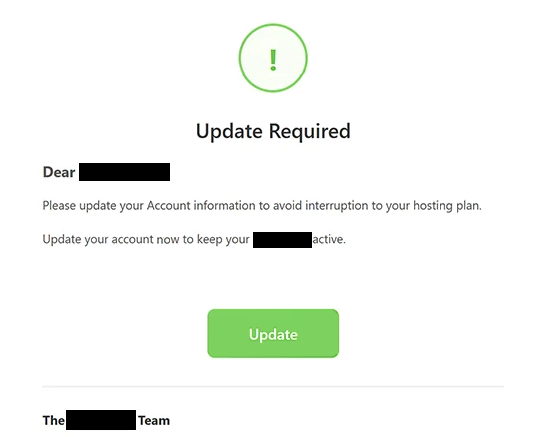
The phishing email presents itself as an automated notification from a hosting company. It claims that the recipient’s account details require attention but does not explain which information is outdated or why an update is necessary. This vague warning creates uncertainty while encouraging recipients to follow the supplied instructions.
To complete the alleged update, recipients are directed to click a button labeled “Update.” Rather than opening a legitimate hosting account management page, the button leads to a phishing website. The website attempts to identify the visitor’s email provider and display a corresponding counterfeit login interface.
One observed version of the phishing page imitates Gmail’s sign-in screen. By displaying a familiar authentication interface, the scammers attempt to convince visitors that they are accessing their usual email service. However, the website is not operated by Google or the hosting provider supposedly responsible for the notification.
The phishing page is designed to capture email addresses and passwords entered by visitors. If attackers obtain valid credentials, they may attempt to access the corresponding mailboxes, read private correspondence, and collect sensitive information. Compromised accounts may also be used to impersonate their owners or distribute additional phishing emails.
Email account access can expose other online services to unauthorized activity. Attackers may attempt password resets for accounts associated with the compromised mailbox, potentially gaining access to additional personal or business information. These consequences depend on the security measures protecting each account.
The “Update your account information to avoid interruption” phishing email is not a legitimate hosting service notification. Its purpose is to obtain login credentials through a deceptive authentication page rather than resolve an actual account problem.
The full “Update your account information to avoid interruption” phishing email is below:
Subject: Update Required: –
Update Required
Dear -,
Please update your Account information to avoid interruption to your hosting plan.
Update your account now to keep your – active.
[Update]The – Team
– Web Hosting Ltd.
Automated account notification • Please do not reply to this email
© 2026 – All rights reserved.
How to recognize phishing emails
The “Update your account information to avoid interruption” phishing email uses a service interruption warning to pressure recipients into taking action. Although legitimate hosting providers may occasionally request account updates, an unexpected email that threatens disruption without explaining the underlying issue should be examined carefully.
One warning sign is the lack of specific information about the account. The phishing email does not identify which details need updating or provide a clear explanation of the supposed problem. Instead, it directs recipients toward a generic update button, making the requested action appear routine.
The destination of the “Update” button is another important indicator. The link leads to an unrelated website rather than the hosting provider’s official account management service. Phishing emails frequently disguise external destinations behind buttons that appear to offer ordinary account maintenance functions.
The counterfeit login page provides further evidence of deception. Although the email concerns a hosting account, the destination may display a Gmail-style authentication form requesting email credentials. This mismatch between the stated purpose of the email and the information requested by the website is characteristic of phishing attempts.
The sender’s identity should also be examined. Phishing emails can include hosting company names, professional formatting, automated notification labels, and copyright notices. These details may create an official appearance but do not establish that the email originated from the organization being impersonated.
Another suspicious characteristic is the use of urgency without meaningful supporting information. The email implies that hosting services could be interrupted if the recipient does not update their account details. This encourages quick action while providing little opportunity to evaluate whether the warning is genuine.
Incoming search terms:
Site Disclaimer
2-remove-virus.com is not sponsored, owned, affiliated, or linked to malware developers or distributors that are referenced in this article. The article does not promote or endorse any type of malware. We aim at providing useful information that will help computer users to detect and eliminate the unwanted malicious programs from their computers. This can be done manually by following the instructions presented in the article or automatically by implementing the suggested anti-malware tools.
The article is only meant to be used for educational purposes. If you follow the instructions given in the article, you agree to be contracted by the disclaimer. We do not guarantee that the artcile will present you with a solution that removes the malign threats completely. Malware changes constantly, which is why, in some cases, it may be difficult to clean the computer fully by using only the manual removal instructions.