

The “Webmail – cPanel Email Account Shutdown” email scam is a phishing campaign that attempts to steal email account credentials by impersonating cPanel, a legitimate web hosting management platform. The phishing emails warn recipients about an unspecified security problem that supposedly threatens their mailbox access. The goal is to convince users to visit a counterfeit login page and provide their usernames and passwords.
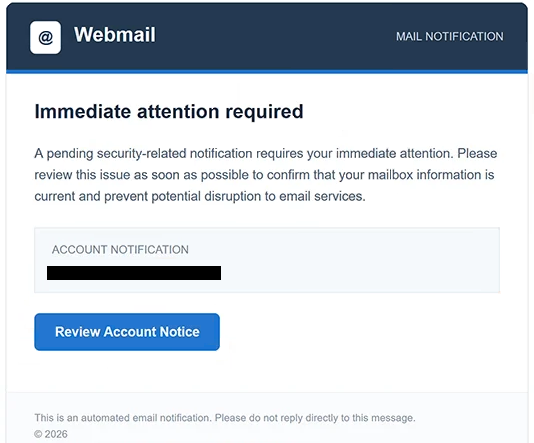
The phishing emails use the subject line “Action Required: cPanel Email Account Shutdown” and present themselves as automated webmail notifications. They claim that a pending security-related issue requires immediate attention and that the recipient must confirm their mailbox information to prevent service disruption. Despite the alarming subject line, the email provides no meaningful explanation of the supposed security problem.
Rather than describing the issue or offering details that recipients could independently verify, the phishing email directs them to a button labeled “Review Account Notice.” This creates the impression that additional information is available through an official account management interface. The notification also includes an automated email disclaimer, a copyright notice, and a system-generated timestamp to reinforce its administrative appearance.
Clicking the button opens a phishing website hosted at pencontrol.com. The website imitates login interfaces belonging to email service providers, with one observed version displaying Gmail branding and an “Authentication Required” heading. Visitors are asked to enter their usernames and passwords, supposedly to complete the account review.
The login form is not connected to the legitimate email service. Credentials submitted through it are captured by the scammers, potentially allowing them to access the affected mailbox. Because the website imitates familiar authentication pages, recipients may not immediately recognize that they have been redirected away from their actual email provider.
Access to a compromised mailbox could expose personal correspondence, confidential attachments, and account-related information. Scammers could also impersonate the account owner, distribute additional phishing emails, or attempt to reset passwords for services linked to the same email address. Stolen credentials might also be offered to other cybercriminals, although these outcomes have not been confirmed for individual victims of this campaign.
The full “Webmail – cPanel Email Account Shutdown” phishing email is below:
Subject: Action Required: cPanel Email Account Shutdown
@ Webmail MAIL NOTIFICATION
Immediate attention required
A pending security-related notification requires your immediate attention. Please review this issue as soon as possible to confirm that your mailbox information is current and prevent potential disruption to email services.
Account notification
[Review Account Notice]
This is an automated email notification. Please do not reply directly to this message.
© 2026
How to recognize phishing emails
Phishing emails claiming that an account is about to be disabled often rely on urgency and vague security warnings. In this campaign, the subject line threatens an email account shutdown, while the body refers only to a pending security-related notification. The absence of a specific explanation is an important warning sign, particularly when recipients are expected to take immediate action.
Another suspicious characteristic is the request to confirm mailbox information through an embedded button. The phishing email does not explain what information is outdated or why an account review is necessary. Instead, it encourages recipients to open an external website where they are asked to authenticate.
The sender’s identity should also be examined carefully. Although the phishing email presents itself as a cPanel notification, recognizable company names and administrative formatting do not establish authenticity. The actual sender address and its domain may reveal inconsistencies with the organization supposedly responsible for the notification.
The destination of the “Review Account Notice” button is especially relevant. It leads to pencontrol.com, a domain unrelated to the legitimate email provider being impersonated. A login page displaying Gmail branding on an unrelated website is a strong indication that the page is intended to deceive visitors.
The “Authentication Required” heading on the phishing website adds another layer of deception. Authentication prompts are common when accessing legitimate email services, but an unexpected password request following a security warning should be treated cautiously. The appearance of a familiar login interface does not establish that the website belongs to the corresponding provider.
Recipients may also notice that the phishing email uses generic administrative language rather than providing account-specific security details. References to system notifications, mailbox confirmation, and service disruption create an official tone without explaining what actually happened. A system-generated timestamp and automated email disclaimer can make the notification appear credible, but neither verifies its origin.
Site Disclaimer
2-remove-virus.com is not sponsored, owned, affiliated, or linked to malware developers or distributors that are referenced in this article. The article does not promote or endorse any type of malware. We aim at providing useful information that will help computer users to detect and eliminate the unwanted malicious programs from their computers. This can be done manually by following the instructions presented in the article or automatically by implementing the suggested anti-malware tools.
The article is only meant to be used for educational purposes. If you follow the instructions given in the article, you agree to be contracted by the disclaimer. We do not guarantee that the artcile will present you with a solution that removes the malign threats completely. Malware changes constantly, which is why, in some cases, it may be difficult to clean the computer fully by using only the manual removal instructions.