

The “Webmail security update verification” phishing email is part of a credential theft campaign that targets users of webmail services. The phishing email is disguised as an official security notification, claiming that the recipient’s email system has recently undergone an update and that mailbox verification is necessary to activate the latest security version.
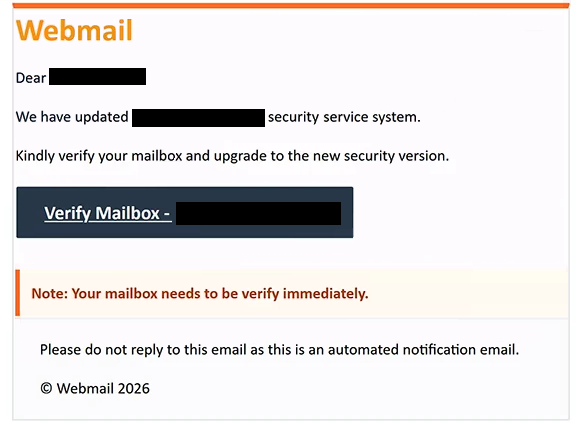
The phishing email uses the subject line “Webmail security update verification” and informs recipients that their domain’s security service system has been updated. It instructs them to verify their mailbox immediately to complete the supposed upgrade. The email also includes the recipient’s address or domain in its content, making the notification appear relevant to their specific email account.
A button labeled “Verify Mailbox” is provided to initiate the supposed verification process. Clicking it directs users to a phishing website that displays a counterfeit webmail login page. The page requests an email address and password, presenting the form as a standard authentication step required to complete the security update.
The phishing website also displays a “Secure SSL Connection” label to reinforce the impression that the login process is protected. However, this label does not establish the website’s legitimacy. The purpose of the counterfeit login form is to capture credentials entered by visitors and make them available to the scammers.
The phishing email also incorporates a copyright reference to cPanel, L.L.C., a legitimate company associated with web hosting management software. This reference is used to make the email appear official, but cPanel has no identified involvement in the phishing campaign. The scammers are exploiting the company’s recognizable name to support their impersonation attempt.
If attackers obtain valid webmail credentials, they may gain access to private correspondence, stored attachments, and other information available through the compromised account. They could also impersonate the account owner, send additional phishing emails to contacts, or attempt to reset passwords for other services connected to the affected email address.
The identified campaign focuses on stealing login credentials rather than distributing malware. Its central deception is the claim that an email security update cannot be completed without immediate mailbox verification, directing recipients to an attacker-controlled login page instead of a legitimate webmail service.
The full “Webmail security update verification” phishing email is below:
Subject: Webmail security update verification
Webmail
Dear –
We have updated – security service system.
Kindly verify your mailbox and upgrade to the new security version.
[Verify Mailbox] –Note: Your mailbox needs to be verify immediately.
Please do not reply to this email as this is an automated notification email.© Webmail 2026
Copyright© 2026 cPanel, L.L.C.
How to recognize phishing emails
Phishing emails impersonating webmail administrators often use security updates, account verification requirements, or service interruptions as reasons to request login credentials. In this campaign, the main warning sign is the unexpected instruction to verify a mailbox immediately after a supposed system upgrade. The phishing email does not provide independently verifiable evidence that the recipient’s email service actually requires such action.
The wording and presentation also provide clues. The email refers to a security service update but does not clearly identify a specific hosting provider responsible for the change. It also contains the grammatically incorrect instruction “Your mailbox needs to be verify immediately,” which is another reason to question its authenticity.
Recipients should pay particular attention to links associated with verification buttons. In this case, the “Verify Mailbox” button leads to a domain unrelated to an identifiable webmail provider. A login page reached through an unexpected external domain should be treated as suspicious, even when it resembles a familiar email interface.
Another characteristic is the use of reassuring security terminology. Labels such as “Secure SSL Connection,” references to system upgrades, and recognizable company names can make phishing websites appear credible. However, none of these elements proves that a website is operated by the organization it claims to represent.
The sender’s actual email address should also be examined rather than relying on the displayed sender name. An unfamiliar domain, an address unrelated to the claimed service provider, or inconsistencies between the sender and the linked website can indicate impersonation. Even when these details appear convincing, they do not independently establish authenticity.
The most reliable way to assess this type of phishing email is to check for account notifications through the legitimate webmail service, accessed independently of the email. The combination of an urgent security update claim, a mailbox verification button, and a login form hosted on an unrelated domain is particularly relevant to identifying the “Webmail security update verification” phishing attempt.
Site Disclaimer
2-remove-virus.com is not sponsored, owned, affiliated, or linked to malware developers or distributors that are referenced in this article. The article does not promote or endorse any type of malware. We aim at providing useful information that will help computer users to detect and eliminate the unwanted malicious programs from their computers. This can be done manually by following the instructions presented in the article or automatically by implementing the suggested anti-malware tools.
The article is only meant to be used for educational purposes. If you follow the instructions given in the article, you agree to be contracted by the disclaimer. We do not guarantee that the artcile will present you with a solution that removes the malign threats completely. Malware changes constantly, which is why, in some cases, it may be difficult to clean the computer fully by using only the manual removal instructions.