

The “IMAP Sync Failure” phishing email disguises credential theft as a technical problem involving incoming mail. Instead of presenting a generic account verification request, the email imitates an automated diagnostic report and claims that an authentication error has disrupted the recipient’s mail server.
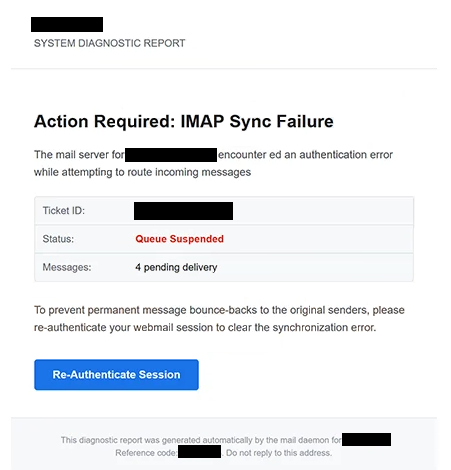
According to the email, the recipient’s mail server encountered an authentication error while attempting to route incoming messages. The supposed consequence is a suspended message queue, with four emails currently waiting for delivery.
Additional technical-looking information is included to support the warning. The email provides the ticket ID, displays the status as “Queue Suspended”, and states that four messages are pending. It also includes a reference code and claims that the diagnostic report was generated automatically by a mail daemon.
Recipients are warned that the pending emails could permanently bounce back to their original senders if the synchronization problem is not corrected. To supposedly clear the error, they are instructed to re-authenticate their webmail session using a “Re-Authenticate Session” button.
There is no genuine IMAP repair behind this button. Clicking it opens a counterfeit webmail login page rather than a legitimate mail-server administration service.
The phishing page copies the appearance of a cPanel Webmail login screen. One detail that can make the page seem particularly convincing is that the victim’s email address is already displayed in the form. This information is taken from the phishing link rather than retrieved from a legitimate account system.
Only the password needs to be entered. Once submitted, it is provided to the scammers operating the phishing page. The action does not restore IMAP synchronization, release four pending emails, or clear a suspended mail queue.
With valid email credentials, scammers may be able to access private correspondence and other information stored in the account. A compromised mailbox can also be used to request password resets for other services or to send deceptive emails while impersonating the account owner.
cPanel is not associated with the “IMAP Sync Failure” phishing email. Its Webmail interface is simply copied to make the credential request appear legitimate.
The full “IMAP Sync Failure” phishing email is below:
Subject: [-] : Please Confirm To Continue.
–
System Diagnostic Report
Action Required: IMAP Sync FailureThe mail server for – encounter ed an authentication error while attempting to route incoming messages
Ticket ID: –
Status: Queue Suspended
Messages: 4 pending deliveryTo prevent permanent message bounce-backs to the original senders, please re-authenticate your webmail session to clear the synchronization error.
[Re-Authenticate Session]This diagnostic report was generated automatically by the mail daemon for -.
Reference code: -. Do not reply to this address.
How to recognize the “IMAP Sync Failure” phishing email
What distinguishes this campaign is its attempt to resemble a server-generated technical report. Terms such as “IMAP Sync Failure”, “authentication error”, “Queue Suspended”, and “mail daemon” create the impression that the warning originated from the infrastructure handling the recipient’s email.
The four pending messages add another layer of pressure. Recipients are not merely told that synchronization has failed. They are led to believe that real incoming emails are already being affected and may soon be returned to their senders.
The ticket and reference numbers can also make the notification appear more formal. The additional reference code looks like identifiers produced by an automated support or diagnostic system, but these details do not establish that the email has access to the recipient’s actual mail server.
The requested solution is more revealing. The email claims that an IMAP authentication problem has suspended incoming mail, then directs the recipient to “Re-Authenticate Session” through an embedded button. Following this instruction leads to a separate web page asking for the mailbox password.
The pre-filled email address on the fake cPanel Webmail page can further reduce suspicion. Seeing the correct address may give the impression that the page has recognized the user’s account. In reality, the address is passed to the phishing page through the link itself.
Recipients who encounter such a warning can check their mailbox independently. If incoming mail or IMAP access genuinely has a problem, users can sign in through their normal webmail address or hosting control panel instead of using a re-authentication link from an unexpected email.
Anyone who already supplied a password through the fake page should change it promptly through the legitimate email service. Other accounts using the same password should be secured as well, and the compromised mailbox should be checked for unfamiliar sessions, forwarding rules, or other unauthorized changes.
Site Disclaimer
2-remove-virus.com is not sponsored, owned, affiliated, or linked to malware developers or distributors that are referenced in this article. The article does not promote or endorse any type of malware. We aim at providing useful information that will help computer users to detect and eliminate the unwanted malicious programs from their computers. This can be done manually by following the instructions presented in the article or automatically by implementing the suggested anti-malware tools.
The article is only meant to be used for educational purposes. If you follow the instructions given in the article, you agree to be contracted by the disclaimer. We do not guarantee that the artcile will present you with a solution that removes the malign threats completely. Malware changes constantly, which is why, in some cases, it may be difficult to clean the computer fully by using only the manual removal instructions.