

The “Incoming Mails Witheld” phishing email is a credential theft attempt built around a fake mail-delivery problem. It tells recipients that important incoming emails have been stopped and will remain unavailable until they verify their account settings.
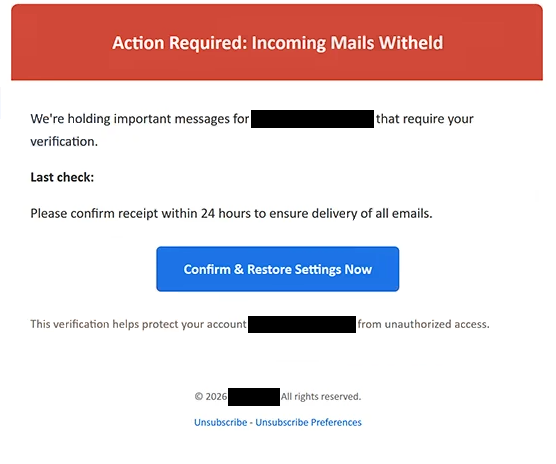
The email uses a subject referring to required action and mail delivery. In the body, the warning becomes more direct with the heading “Action Required: Incoming Mails Witheld”. It claims that important emails addressed to the recipient are currently being held because verification is required.
To make the situation look current, the email provides a “last check” date and time. Recipients are then given 24 hours to confirm receipt, with the implication that completing the requested verification will allow all pending emails to be delivered.
The provided button says “Confirm & Restore Settings Now”. This is not a genuine function for restoring mailbox settings. Following it takes the recipient to a phishing website created to obtain email account credentials.
In the analyzed case, the resulting page was designed to resemble a Gmail login screen. It displayed the Gmail logo and already had the recipient’s email address entered into the relevant field. The visitor was asked for a password and provided with a “Continue” button.
The pre-filled address can make the page appear connected to the user’s real mailbox, but the site is not operated by Google. Information entered into the form is submitted to the scammers behind the campaign.
The phishing setup can also adapt according to the recipient’s email provider. Therefore, not every recipient necessarily sees the same Gmail-style page. A user with an account from another provider may instead be shown a login interface designed to resemble that service.
The goal remains the same regardless of which login design appears: obtaining the password associated with the recipient’s email address. The claims about held incoming mail and settings requiring restoration are simply used to lead the victim to that credential form.
If credentials have already been submitted, the affected email password should be changed immediately through the legitimate provider. Reused passwords on other accounts should also be replaced, and the account should be checked for unfamiliar sessions, devices, or changes.
The full “Incoming Mails Witheld” phishing email is below:
Subject: Action Required for – recipients: Mail Delivery
Action Required: Incoming Mails Witheld
We’re holding important messages for – that require your verification.
Last check:
Please confirm receipt within 24 hours to ensure delivery of all emails.
[Confirm & Restore Settings Now]
This verification helps protect your account – from unauthorized access.
© 2026 -. All rights reserved.
[Unsubscribe] – [Unsubscribe Preferences]
How to recognize the “Incoming Mails Witheld” phishing email
The main pressure tactic in this campaign is the claim that messages are already being withheld. Instead of warning about a problem that might occur later, the “Incoming Mails Witheld” phishing email tells recipients that important emails are currently waiting and cannot be delivered until verification takes place.
The 24-hour deadline adds another reason to act quickly. Someone expecting an important business or personal email may be more inclined to select “Confirm & Restore Settings Now” rather than first determining whether the warning came from their actual email provider.
The “last check” timestamp also deserves attention. A precise date and time can make the notification appear to have been automatically generated from a real mail system. In this case, however, the technical-looking detail accompanies a fabricated delivery problem and does not prove that the sender has access to the recipient’s mailbox status.
There is also a mismatch between the stated problem and the requested action. The email claims that messages are being held until settings are confirmed, but following its instructions leads to a page requesting the password for the email account. Entering a password on that page does not release pending emails.
The personalized login page can make this scam harder to identify at a glance. Having the recipient’s address already filled in may suggest that the website recognizes the account. That information can instead be passed from the phishing link and used to make the page appear more convincing.
Recipients should pay attention to where the “Confirm & Restore Settings Now” button actually leads. Familiar Gmail or other webmail branding on the destination page is not enough to establish authenticity. The domain should belong to the expected email provider before any credentials are entered.
A supposed mail-delivery problem can also be checked without using the email at all. Opening the normal webmail application or navigating independently to the provider’s legitimate site allows the user to check the mailbox directly.
Site Disclaimer
2-remove-virus.com is not sponsored, owned, affiliated, or linked to malware developers or distributors that are referenced in this article. The article does not promote or endorse any type of malware. We aim at providing useful information that will help computer users to detect and eliminate the unwanted malicious programs from their computers. This can be done manually by following the instructions presented in the article or automatically by implementing the suggested anti-malware tools.
The article is only meant to be used for educational purposes. If you follow the instructions given in the article, you agree to be contracted by the disclaimer. We do not guarantee that the artcile will present you with a solution that removes the malign threats completely. Malware changes constantly, which is why, in some cases, it may be difficult to clean the computer fully by using only the manual removal instructions.