

The “Mailbox Usage Alert” phishing email uses a nearly full inbox as the reason for asking recipients to sign in. It presents what appears to be a routine storage notification, but the reported usage is fabricated, and the provided storage-management option leads to a credential-stealing website.
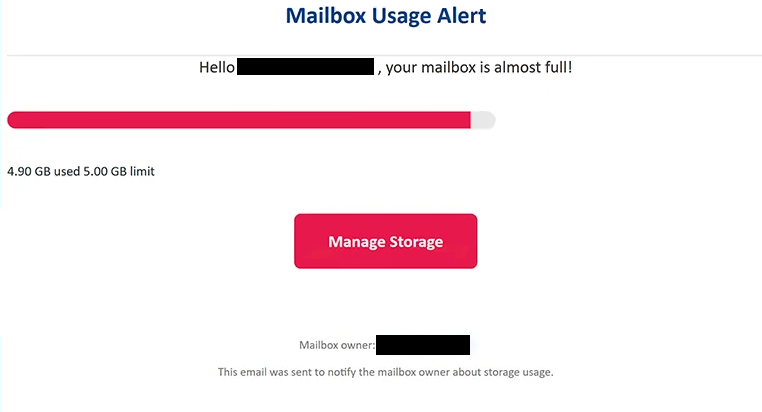
According to the email, the recipient has already used 4.90 GB of a 5.00 GB mailbox allowance. With very little capacity supposedly remaining, the warning says that the mailbox is almost full and encourages the user to manage the available storage.
A “Manage Storage” button is provided as the apparent solution. Someone who regularly receives large attachments or keeps years of email may find such a warning plausible, especially because the email provides specific figures rather than simply stating that storage is running low.
The button, however, does not open a genuine storage-management page. It directs the recipient to a phishing site designed to collect email login credentials.
This campaign uses a phishing page that can determine the recipient’s email service provider from the email address and adjust its appearance accordingly. This allows the scammers to show a login interface that is more relevant to the person opening the link instead of displaying the same generic form to everyone.
During analysis, the site presented a fake “Gmail Secured Portal”. The credential form was styled to resemble Google’s sign-in interface and appeared over a background designed to look like the genuine Gmail login page.
The site asks for a username and password. Information submitted there goes to the scammers rather than to the recipient’s email provider. No mailbox storage is managed or expanded by completing the fake sign-in process.
Obtaining an email password can give scammers access to much more than stored messages. A compromised inbox may contain private correspondence and information about other services. It can also be connected to accounts that use the email address for password recovery.
Anyone who has already entered credentials through the “Manage Storage” page should change the affected email password immediately. The same password should also be replaced wherever else it has been reused. Reviewing recent account activity and unfamiliar sessions is also appropriate after credentials have been exposed.
The full “Mailbox Usage Alert” phishing email is below:
Subject: Alert: Mailbox Usage Warning – –
Mailbox Usage Alert
Hello – , your mailbox is almost full!
4.90 GB used 5.00 GB limit
[Manage Storage]Mailbox owner: –
This email was sent to notify the mailbox owner about storage usage.
How to identify the “Mailbox Usage Alert” phishing email
The storage figures are one of the elements that make this phishing attempt look convincing. The email does not use an approximate warning such as “your mailbox is 90% full”. Instead, it states that 4.90 GB has been consumed out of a 5.00 GB limit. Precise numbers can give the impression that the notification was generated from real account data, but in this case they are part of the deception.
The subject also frames the email as a straightforward mailbox warning rather than an obvious security emergency. This approach may encourage recipients to view “Manage Storage” as an ordinary account-maintenance function.
What happens after selecting that button is more revealing. Managing storage should take users to settings associated with their actual email service. Instead, this campaign sends them to a separate phishing site and attempts to obtain their login credentials.
The ability of the page to imitate the recipient’s provider can further obscure the scam. A Gmail user may encounter Google-style branding, while the phishing setup is capable of determining the email service from the supplied address. Seeing the expected provider’s branding after following the link therefore does not establish that the page is genuine.
The domain in the browser’s address bar is a more useful detail to examine. A familiar logo, background, or sign-in form can be copied, while a phishing site remains hosted outside the legitimate provider’s infrastructure.
Recipients can also verify a storage warning without using “Manage Storage”. Opening the normal email application or manually accessing the provider’s website allows users to check their actual mailbox capacity from the account settings. If the mailbox really is close to its limit, that information should be available there.
Site Disclaimer
2-remove-virus.com is not sponsored, owned, affiliated, or linked to malware developers or distributors that are referenced in this article. The article does not promote or endorse any type of malware. We aim at providing useful information that will help computer users to detect and eliminate the unwanted malicious programs from their computers. This can be done manually by following the instructions presented in the article or automatically by implementing the suggested anti-malware tools.
The article is only meant to be used for educational purposes. If you follow the instructions given in the article, you agree to be contracted by the disclaimer. We do not guarantee that the artcile will present you with a solution that removes the malign threats completely. Malware changes constantly, which is why, in some cases, it may be difficult to clean the computer fully by using only the manual removal instructions.