

The “Email Validation Required” phishing email is a credential theft attempt presented as an automated mailbox security notice. Its premise is simple: a problem has supposedly been detected in the recipient’s email account, and validation is required to keep the mailbox working normally.
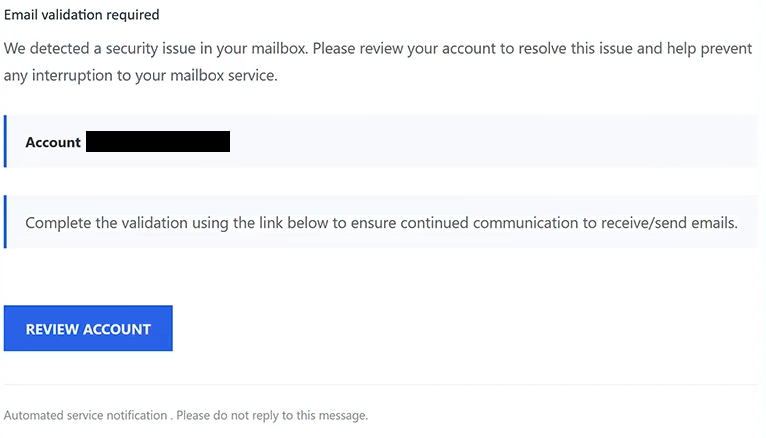
The email uses the subject “Email validation required”. It states that a security issue has been found in the mailbox and warns that the problem could interfere with the user’s ability to send and receive emails.
No particular email provider is identified. Instead, the notification uses broad references to the recipient’s mailbox and account, allowing the same email to appear relevant to people using different webmail services.
Recipients are told to complete a validation procedure to ensure continued communication. The only way offered to perform this supposed check is a “REVIEW ACCOUNT” button included in the email.
This button does not open a real account-security page. It sends the recipient to a fake cPanel Webmail login page hosted through an external file-storage service. The purpose of the page is to obtain the password for the targeted email account.
The phishing form is personalized by displaying the recipient’s email address automatically. Since the address is already filled in, the visitor only needs to enter the associated password. This can make the page appear as though it already recognizes the user’s account.
Submitting the password does not validate the mailbox or resolve a security problem. The information is delivered to the scammers behind the campaign.
Access to an email account can expose private correspondence and other information stored in the mailbox. Scammers may also attempt to reset passwords for services connected to the compromised address or use the hijacked account to send additional deceptive emails.
The cPanel name and Webmail interface are being imitated without authorization. cPanel is not responsible for the email or the fake login page.
Anyone who has already entered a password through the fraudulent page should change it using the legitimate email service. If that password is used for other accounts, those passwords should be replaced as well. Active sessions and account settings should also be reviewed for unauthorized changes.
The full “Email Validation Required” phishing email is below:
Subject: Email validation required
Email validation required
We detected a security issue in your mailbox. Please review your account to resolve this issue and help prevent any interruption to your mailbox service.
Account –
Complete the validation using the link below to ensure continued communication to receive/send emails.
[REVIEW ACCOUNT]
Automated service notification . Please do not reply to this message.
How to recognize the “Email Validation Required” phishing email
This phishing attempt avoids naming a specific provider, which is an important characteristic of the campaign. The email talks about a “security issue” in the recipient’s mailbox without clearly explaining which company detected it or which service supposedly requires validation.
The problem itself is similarly vague. No details are provided about what the security issue actually is. Instead, the email quickly shifts attention to the possible consequence: disruption to sending and receiving emails.
This creates pressure without giving recipients enough information to independently evaluate the alleged problem. The “REVIEW ACCOUNT” button is then presented as the direct way to prevent the interruption.
The destination of that button exposes the real purpose of the email. A general mailbox-security warning eventually leads to a cPanel-style Webmail login form asking for a password. The fact that the recipient’s email address is already displayed can make the transition appear legitimate, but a pre-filled address is not proof that the website belongs to the user’s provider.
The hosting location also matters. The phishing page is placed on an external file-storage service rather than a legitimate account portal belonging to the recipient’s email provider. Familiar Webmail branding can be copied onto such a page regardless of who actually controls it.
Users who receive the “Email Validation Required” phishing email do not need to select “REVIEW ACCOUNT” to determine whether their mailbox has a problem. They can open their normal webmail application or manually visit their provider’s legitimate login page and inspect the account from there.
Site Disclaimer
2-remove-virus.com is not sponsored, owned, affiliated, or linked to malware developers or distributors that are referenced in this article. The article does not promote or endorse any type of malware. We aim at providing useful information that will help computer users to detect and eliminate the unwanted malicious programs from their computers. This can be done manually by following the instructions presented in the article or automatically by implementing the suggested anti-malware tools.
The article is only meant to be used for educational purposes. If you follow the instructions given in the article, you agree to be contracted by the disclaimer. We do not guarantee that the artcile will present you with a solution that removes the malign threats completely. Malware changes constantly, which is why, in some cases, it may be difficult to clean the computer fully by using only the manual removal instructions.